


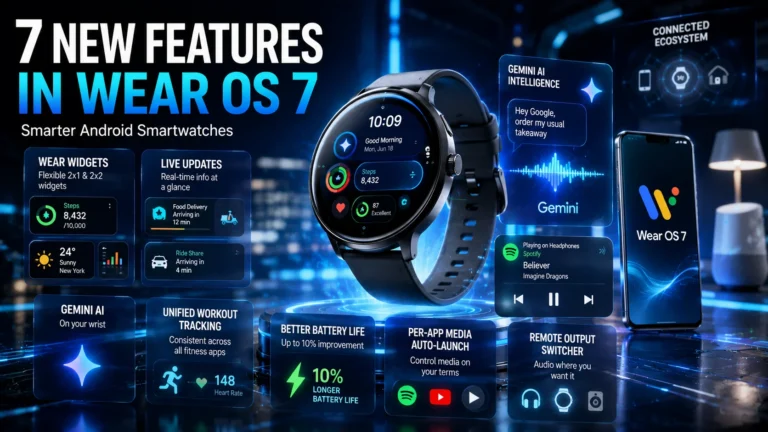
Google has officially started rolling out Wear OS 7, and it marks one of the more meaningful updates the smartwatch platform has seen in a while. The headline idea behind this release is simple but ambitious — turning your watch from something that just buzzes with notifications into something that actually helps you get things done.
Underpinning much of that shift is Google Gemini, baked directly into the wrist experience. But alongside the AI additions, there are some genuinely useful interface changes too — some of them long overdue. Here’s everything coming with Wear OS 7, and when you can expect to get it.
Who’s Getting It First
Google has kicked off the rollout with its own hardware — the Pixel Watch 4, Pixel Watch 3, and Pixel Watch 2 are the first devices to receive the update, arriving alongside Android 17 in June. That’s notable because Google has traditionally synced non-Samsung rollouts with its autumn hardware refresh, so releasing this in June is a break from the usual pattern.
If you own a OnePlus, Oppo, or Xiaomi smartwatch, you’ll need to wait a bit longer. Those brands are still finishing up their Wear OS 6 rollouts, so Wear OS 7 likely won’t reach their devices until well into next year. Samsung is expected to be next in line, with One UI 9 Watch — built on Wear OS 7 — tipped for a July release, though which specific Galaxy Watch models will get it hasn’t been confirmed yet.
1. Wear Widgets Replace Tiles
The classic Tile system that’s been part of Wear OS for years is being phased out in favour of something called Wear Widgets. Instead of the old linear scrolling format, you now get a flexible grid layout supporting both 2×1 and 2×2 sizes, which means significantly more information fits on your watch face at a glance.
Google has also confirmed that a future winter update will let you build custom widgets just by describing what you want using your voice, powered by Gemini.
2. Live Updates Right on Your Wrist
This is one of the most immediately useful additions. Live Updates bring real-time, glanceable tracking straight to your watch — think food delivery progress, rideshare arrival times, or live sports scores, all without needing to pull out your phone or open a separate app.
You’ll see a small icon at the bottom of your watch face that you can tap for details, plus a card at the top of your notifications feed showing key information like estimated delivery time. It’s similar in spirit to Apple’s Live Activities on the Apple Watch, and honestly, it’s the kind of feature that makes a smartwatch feel genuinely useful rather than just a glorified notification screen.
3. Gemini Intelligence and Task Automation
This is where Wear OS 7 gets genuinely ambitious. Google’s AI assistant Gemini is now built directly into the watch, capable of handling multi-step tasks through voice commands alone. Want to reorder your usual takeaway? Need to cross-reference an email to build a shopping list? You can ask your watch to handle it.
This feature, along with the custom widget creation mentioned earlier, isn’t available on day one — it’s expected to roll out over the coming months as Google expands Gemini Intelligence across its wearable lineup.
4. Unified Workout Tracking
If you’ve ever noticed that your heart rate readings or workout layouts look completely different depending on which fitness app you’re using, Wear OS 7 aims to fix that. Google is introducing a standardised Workout Track experience that third-party apps can adopt, ensuring consistent UI, media controls, and heart-rate behaviour across the board. It’s a small thing, but it should make switching between fitness apps feel a lot less jarring.
5. Better Battery Life
Google says under-the-hood system optimisations should deliver up to a 10% improvement in battery life compared to Wear OS 6 — even with all the extra AI processing happening on the watch. The exact gain will likely vary by device, but for a platform that’s always battled battery anxiety, any meaningful improvement here is welcome.
6. Per-App Media Auto-Launch
This is a small but genuinely handy fix. Previously, any sound playing on your phone would force the media player interface open on your watch — annoying if you’re just scrolling through a video and don’t want your wrist taken over. Now you can control auto-launch behaviour on a per-app basis, so you can keep it active for Spotify but switched off for casual video browsing.
7. Remote Output Switcher
Audio routing gets simpler too. A new System Media Controls tool lets you switch where your audio is playing — Bluetooth headphones, your watch speaker, or a smart home setup — directly from your wrist, without needing to dig through your phone’s settings.
What’s Available Right Now vs Later
Not everything is live immediately. Live Updates, the improved battery optimizations, and the audio output switcher are all available from day one. Gemini-powered features like custom widget creation and task automation are coming over the next few months as Google continues building out its AI integration across Wear OS.
Also Read: 5 Warning Signs Your Smartphone Needs Replacement Immediately
Wear OS 7 isn’t a flashy, all-at-once overhaul — it’s a steady, practical update that focuses on making your watch genuinely more useful throughout the day. Whether it’s tracking your delivery without reaching for your phone, getting a meaningful battery boost, or eventually asking Gemini to handle small daily tasks, this update leans into usefulness over spectacle. If you own a Pixel Watch 2 or newer, the update should already be available — everyone else will have to wait a little longer for their turn.