


Close Menu
FlickonclickFlickonclick
    Facebook X (Twitter) Instagram Pinterest
    FlickonclickFlickonclick
    Facebook X (Twitter) Instagram
    Contact Us
    • Home
    • Entertainment
      • OTT
        • Amazon Prime Video
        • Amazon miniTV
        • Amazon MX Player
        • JioHotstar
        • Netflix
        • ShemarooMe
        • SonyLiv
        • ULLU App
        • Zee5
      • Reviews
        • Movie Reviews
        • Web Series Review
      • Cast Salary & Budget
      • Guides
      • Box Office Collection
    • Photos
    • Lifestyle
    • Wealth
    • Latest News
      • Trending
      • Finance
      • Fitness
      • Technology
    • Biography Corner
    • More
      • About Us
      • Contact Us
      • Advertise with Us
      • Privacy Policy
      • Disclaimer
      • Cookie Policy
    FlickonclickFlickonclick
    Home » Technology » 10 Unknown whatsapp features you have definitely not used
    Technology

    10 Unknown whatsapp features you have definitely not used

    By Flickonclick StaffSeptember 3, 2022
    Facebook Twitter WhatsApp Email
    10 Unknown whatsapp features you have definitely not used

    Are you looking for ways to maximize WhatsApp on your iPhone or Android device? We are on your side. WhatsApp is a massively successful messaging service with over 2 billion active monthly users. The software is continually adding new features, and every few weeks we find a new, intriguing update. What are the latest updates to WhatsApp that you need to be aware of? Here are some helpful 10 undiscovered WhatsApp features you’ve probably never used if you routinely use it for personal or professional reasons and are seeking ways to improve your chatting experience.

    10 Unknown WhatsApp features you have definitely not used

    1. Message Scheduling

    Unknown whatsapp features include scheduling

    Even when they are not online, users can schedule messages on whatsapp to be sent at a certain time or date using message scheduling. For example, you could not be a morning person yet you need to remind a friend to accomplish something at 7 am the next day.

    Add Flickonclick as the preferred Google News source

    When you type the message and schedule it to be sent at that time, you can relax knowing that your friend will receive the reminder as you enjoy some downtime in bed. This function allows busy users to arrange the sending of birthday and anniversary texts at specific times.


    2. View deleted WhatsApp messages

    View deleted WhatsApp messages

    There is a way to read deleted texts from your friends’ end. To read the notification, simply download a notification log app and grant access. This software will retain a record of every notification that comes in and will be useful if you need to get a notification back that you accidentally swiped off.


    3. Make your messages disappear

    Make your messages disappear

    Disappearing messages are now a feature that WhatsApp is now rolling out, allowing you to enable the capability for particular conversations. When it’s turned on, your whole chat history will vanish after seven days.

    You can enable the WhatsApp disappearing messages feature by pressing on the contact or chat’s name at the top of your screen. Choose Disappearing Messages from the available choices then tap On.


    4. Invisible Mode

    Invisible Mode

    WhatsApp still displays your online status to your contacts regardless of how many visibility options you select. Additionally, it cannot be turned off. If you are attempting to avoid someone you do not want to block, this is especially annoying. You could open the app and possibly stop unwanted conversations if you could keep your online status secret from other people.


    5. Share Live Location (Real Time) 

    Share Live Location (Real Time)

    You may now let your contacts know where you are in real-time. Real-time location updates allow you to track the precise whereabouts of particular contacts. You have the option of sharing your location for 15, 1, or 8 hours nonstop.

    • Simply tap the attachment symbol in the text input area to accomplish this.
    • Next, choose “location” and then “Share Live Location.”


    6. Mark messages to answer later
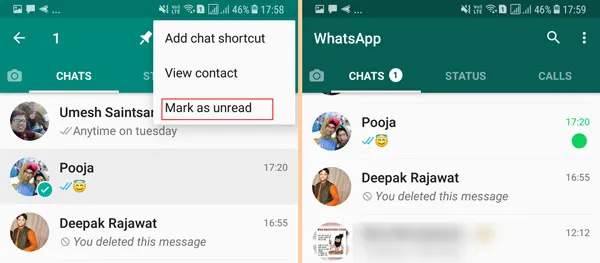
    Mark messages to answer later

    If you have seen a message but want to respond to it later, you may simply designate the discussion as unread by long-pressing the conversation head in the “Chat” tab.
    This will mark the message with a swollen green dot that will act as a reminder but won’t remove “Blue ticks” or read receipts. Later, you are free to respond to the words as you please.


    7. Star a message so it’s easy to find later

    Star a message so it's easy to find later

    By giving a message a star, you may easily return to a valuable message, contact information, address, or article link that a friend has provided you. To access the Star icon, long-press the message and then tap it. The message will have a tiny star icon next to it so you can quickly spot it when browsing through your discussion.


    8. Personal Chat Lock

    Personal Chat Lock

    Users can currently lock their WhatsApp accounts using a password or biometric data. The downside is that once your app is unlocked, anyone might still see all of your WhatsApp chats, so it’s not exactly a foolproof privacy solution.

    Allowing users to lock certain talks or giving them the choice of an additional biometric or pin lock for particular chats would be a more secure solution. In this manner, even if a third party gains access to your WhatsApp, those private talks are safeguarded.


    9. Format WhatsApp Messages
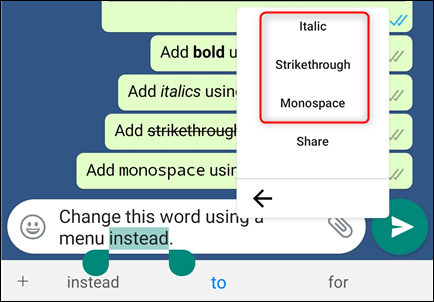
    Format WhatsApp Messages

    Change the font, add bold, italics, and strikethrough to WhatsApp messages.
    Your WhatsApp messages’ fonts can also be formatted. Simply long-press the text you want to format after entering it into the message input field to do so. You now have the choice of bold, strikethrough, or italicising the format. Change the font using the “Monospace” option as well.


    10. Get personalised notifications
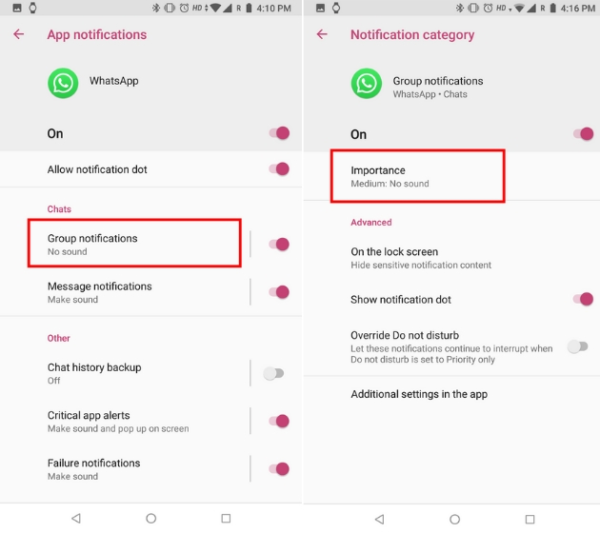
    Get personalised notifications

    You can establish unique notifications for certain contacts so that they don’t all receive the same alert sound upon receiving a message. By doing this, it will be simpler to determine who messaged you without having to check your phone.

    When browsing a chat thread on Android, users should select the Menu icon, choose View Contact > Custom Notifications, check the box, and then complete the configuration.

    When browsing a chat thread in WhatsApp on an iPhone, press the contact’s name, then select Custom Tone.


    Android WhatsApp WhatsApp Features Whatsapp Latest Feature
    Previous ArticleCan Brahmastra, a high-budget movie featuring Alia Bhatt & Ranbir will withstand a new Bollywood boycott trend?
    Next Article Best tricks and tips to get free netflix subscription
    Flickonclick Staff

      We're the folks behind Flickonclick—a team of writers who love staying on top of what's happening in entertainment, sports, lifestyle, and everything trending. We write the way we talk: simple, clear, and straight to the point. No fancy jargon, no boring stuff—just stories that keep you informed and entertained. Whether you're looking for the latest movie reviews, sports updates, or lifestyle tips, we've got you covered with content that actually makes sense.

      Related Posts

      Technology January 8, 20262 Mins Read

      WhatsApp Brings Major New Year Updates to Improve User Experience

      News November 7, 20252 Mins Read

      Government Agency Warning! Major Threat for Android 13, 14, 15, and 16 Users

      Technology April 14, 20253 Mins Read

      From Online Indicator to Document Scanner: 12 New Features Added to WhatsApp

      Technology March 9, 20252 Mins Read

      This Decades-Old Feature Might Return in Android 16, Release Date Revealed

      Technology March 8, 20252 Mins Read

      WhatsApp Rolls Out 5 New Features, Changing the Chatting Experience

      Technology February 25, 2025Updated:February 25, 20252 Mins Read

      WhatsApp Bans Over 9 Million Accounts in India- Know Why

      Technology January 6, 20252 Mins Read

      WhatsApp Introduces Built-In Document Scanner: Here’s How It Works

      Technology December 31, 20242 Mins Read

      List of Android Phones That Will No Longer Support WhatsApp from January 1

      Latest Articles

      Sarvam AI: India’s Sovereign AI Startup Transforming Indic Language Technology

      February 9, 2026

      Do Deewane Seher Mein Cast Salary and Movie Budget

      February 9, 2026

      Mrunal Thakur Hot Photos: 14 Bold Pictures That Will Surprise You

      February 9, 2026

      Do Deewane Seher Mein Movie Release Date, Cast Details, Story, and Trailer

      February 9, 2026

      Kritika Kamra and Gaurav Kapur Set to Marry in March 2026: Everything You Need to Know

      February 9, 2026

      Kritika Kamra Net Worth 2026: Income Sources, Career Earnings and Financial Growth

      February 9, 2026

      Manoj Muntashir Net Worth 2026: Income Sources, Career Earnings and Wealth Overview

      February 9, 2026

      Red Label Movie Review: A College Thriller With Politics, Romance, and a Familiar Yet Engaging Mystery

      February 8, 2026

      Top 10 Legendary Indian Singers Who Defined Bollywood Music Forever

      February 8, 2026

      Nukkad Naatak Release Date, Cast & Story: A Heartfelt Film Rooted in Real India

      February 7, 2026
      About Flickonclick

      Flickonclick brings you the latest updates across entertainment, lifestyle, tech, and more. Stay informed with trending news and stories that matter.

      Facebook X (Twitter) Instagram
      Latest Articles
      • Sarvam AI: India’s Sovereign AI Startup Transforming Indic Language Technology
      • Do Deewane Seher Mein Cast Salary and Movie Budget
      • Mrunal Thakur Hot Photos: 14 Bold Pictures That Will Surprise You
      • Do Deewane Seher Mein Movie Release Date, Cast Details, Story, and Trailer
      Important Links
      • About Us
      • Advertise with Us
      • Contact Us
      • Cookie Policy
      • Disclaimer
      • Home
      • Privacy Policy
      • Terms & Conditions
      © 2025 Flickonclick. All Rights Reserved

      Type above and press Enter to search. Press Esc to cancel.