


AI tools have quietly become part of daily life. People use them for work, for personal notes, even for storing sensitive information.
But as that trust grows, so do the security risks. OpenAI’s answer to this is a new feature called Lockdown Mode. It’s available to every ChatGPT user, including those on the free plan.
Why OpenAI Built This
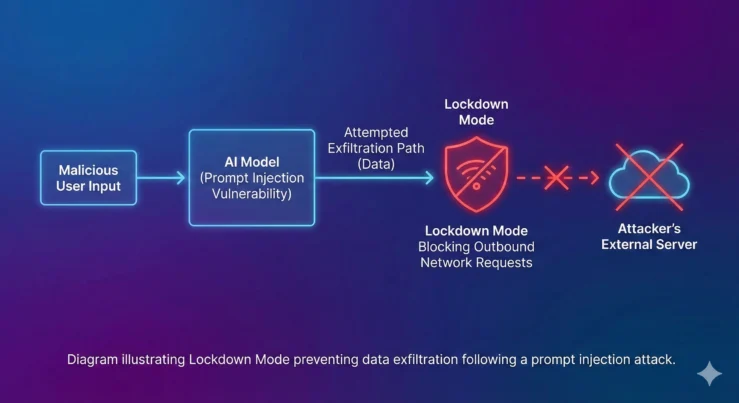
The feature exists to tackle something called a prompt injection attack.
This isn’t your typical hacking attempt. There’s no breaking into servers or stealing passwords directly.
Instead, attackers hide instructions inside things like:
- Webpages
- Uploaded files
- Other online content the AI might read
If ChatGPT processes that content without catching the hidden instructions, it could end up behaving in ways it shouldn’t. In the worst cases, it might even reveal information you never meant to share.
OpenAI describes Lockdown Mode as an extra safeguard sitting on top of ChatGPT’s existing protections. Think of it like adding a second lock to your front door — you’re not replacing the first one, just making it harder for anyone to get through.
What Changes When You Turn It On
Once enabled, ChatGPT behaves a bit more cautiously across the board.
You can still do most of the basics:
- Upload files
- Share images
- Generate AI images
But certain features that rely on pulling content from the open web become more limited.
For instance, ChatGPT may stop fetching certain images directly from the internet or showing them inline in your chat. The idea is simple — the less ChatGPT reaches out to unpredictable external sources, the smaller the chance something malicious sneaks through.
OpenAI has also switched off two of its more powerful tools while Lockdown Mode is active:
- Deep Research, which digs through multiple web sources to build detailed reports
- Agent Mode, which lets ChatGPT take actions across websites and services on your behalf
Both of these tools interact heavily with external content, which is exactly the kind of activity Lockdown Mode is designed to restrict.
Who Actually Needs This
Here’s the truth — most people probably won’t notice much difference in their day-to-day use, and that’s fine.
OpenAI has been pretty upfront that this isn’t meant for everyone. If you’re using ChatGPT to draft emails, brainstorm ideas, or get quick answers to random questions, Lockdown Mode probably isn’t necessary for you.
It’s built with a more specific audience in mind:
- Professionals handling client or company data
- Organisations working with confidential material
- Researchers processing sensitive datasets
- Journalists protecting sources and unpublished material
- Anyone who regularly works with information that simply can’t afford to leak
For people in these categories, giving up a bit of convenience in exchange for tighter security is usually an easy trade to make.
Should You Turn It On?
If your daily ChatGPT use revolves around casual tasks, you can likely skip this one without missing much.
But if you’re someone who feeds sensitive documents into ChatGPT, works in a high-risk industry, or simply wants the peace of mind that comes with an extra layer of protection, Lockdown Mode is worth switching on.
It’s not about distrust in ChatGPT itself. It’s about being realistic — the more AI tools get woven into our work and personal lives, the more attractive a target they become for people looking to exploit them.
Also Read: Wear OS 7 Is Here: 7 Key Features Coming to Your Android Smartwatch
This move from OpenAI reflects something happening across the entire AI industry right now. As these tools get smarter and more capable, the attack surface grows right along with them.
Features like Deep Research and Agent Mode are powerful precisely because they reach beyond the chat window and interact with the wider internet. That power is also what makes them a bit riskier in certain contexts.
Lockdown Mode is OpenAI’s way of giving users control over that trade-off. You decide how much convenience you’re willing to give up in exchange for extra safety.
For most casual users, daily life with ChatGPT continues exactly as before. But for the people who genuinely need it, that second locked door could make all the difference.