

Close Menu
FlickonclickFlickonclick
    Facebook X (Twitter) Instagram Pinterest
    FlickonclickFlickonclick
    Facebook X (Twitter) Instagram
    Contact Us
    • Home
    • Entertainment
      • OTT
        • Amazon Prime Video
        • Amazon miniTV
        • Amazon MX Player
        • JioHotstar
        • Netflix
        • ShemarooMe
        • SonyLiv
        • ULLU App
        • Zee5
      • Reviews
        • Movie Reviews
        • Web Series Review
      • Cast Salary & Budget
      • Music
      • Box Office Collection
      • Celebrity
        • Biography Corner
        • Photos
        • Wealth
    • Lifestyle
      • Dating & Relationships
      • Fashion
      • Product Reviews
      • Travel
      • Food
      • Fitness
    • Technology
      • Smartphones
    • Finance
      • Cryptocurrency
      • Startups
    • Sports
    • Latest News
      • India
      • Global
      • Trending
    • More
      • About Us
      • Advertise with Us
      • Contact Us
      • Privacy Policy
      • Disclaimer
      • Cookie Policy
    FlickonclickFlickonclick
    Home » Technology » OpenAI Launches Scheduled Tasks in ChatGPT: Here’s How AI Can Now Work Automatically
    Technology

    OpenAI Launches Scheduled Tasks in ChatGPT: Here’s How AI Can Now Work Automatically

    ChatGPT can now run prompts automatically at set times or under specific conditions, turning the AI assistant into a genuinely proactive tool for managing recurring work.
    By Mohan NasreJune 22, 2026
    Facebook Twitter WhatsApp Email
    OpenAI Launches Scheduled Tasks in ChatGPT: Here's How AI Can Now Work Automatically

    ChatGPT has always been good at answering questions and helping with tasks in the moment. But starting June 18, 2026, it can now do things without you being in the room. OpenAI has officially launched Scheduled Tasks for Go, Plus, Pro, Business, and Enterprise subscribers on both web and mobile — a feature that shifts ChatGPT from something you use reactively to something that actually works for you in the background.

    As OpenAI put it in their announcement: users can now schedule one-off and recurring tasks, and ask ChatGPT to check for changes and send notifications when something meaningful happens.

    What Scheduled Tasks Do

    The core idea is straightforward. You tell ChatGPT what you want it to do and when, and it handles the rest without you needing to come back and prompt it again. Practically speaking, that means you can set it to run a daily report every morning, send you a weekly summary of industry news, remind you about important dates, or monitor connected apps for meaningful changes and alert you only when something worth knowing actually happens.

    Tasks can be triggered at a specific time or date, run on a recurring schedule, or configured to monitor conditions and notify you when they’re met. The feature is capped at running once per hour, and tasks that sit unused for a while may automatically pause to prevent system overload.
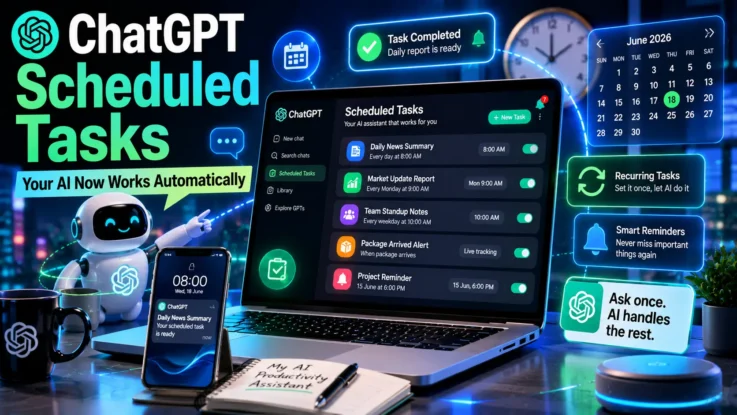
    OpenAI Launches Scheduled Tasks in ChatGPT - What It Does and How to Use It

    Key Improvements Over Previous Versions

    This replaces and significantly expands on ChatGPT’s earlier Tasks feature. The changes are worth knowing:

    A new Scheduled page in the sidebar gives you one dedicated place to see all active tasks, check when they’ll run next, and manage them — pausing, resuming, editing, or deleting as needed. Tasks now execute faster and more reliably than before. Scheduling is more flexible too, letting you pick either a specific time or a broader window like morning, afternoon, or evening.

    Active task limits vary by plan — Go users can have up to 3, Plus users up to 5, Business and Education users up to 10, and Pro and Enterprise users up to 15.

    This update also replaces ChatGPT Pulse, the daily summary feature launched in September 2025, which will be discontinued within 14 days of this rollout.

    How to Use Scheduled Tasks

    Step 1: Select the right model

    Open a new chat and choose o3 or o4-mini from the model dropdown. These are the Task-enabled models — the old Tasks option in the picker has been replaced.

    Step 2: Write your task request

    Keep it simple and specific. Examples that work well: “Every weekday at 7:00 AM, summarize the top three Sprint bottlenecks” or “Remind me about my mum’s birthday on March 13th” or “Notify me when my package arrives.”

    Step 3: Enable notifications

    ChatGPT will confirm the schedule and ask you to enable notifications. Grant push or email permissions when prompted.

    Step 4: Test before committing

    Set the task to run “in one minute” first to check the output quality before committing to your actual schedule. Adjust the prompt if needed, then switch to the real timing.

    Step 5: Manage your tasks

    Go to Settings, then Notifications, then select Manage Tasks to see everything you’ve set up. You can also access the full task list from the Scheduled page in the sidebar, or by clicking the three-dot menu on any individual task in chat.

    Also Read: ChatGPT’s New Lockdown Mode: What It Is and How It Actually Works

    Best Use Cases

    Scheduled Tasks work particularly well for anything that needs to happen consistently without you remembering to prompt it. Weekly planning every Monday morning, monthly performance reviews every last Friday, daily briefings summarizing the previous day’s conversations, comparative company analyses, investor update summaries, or coaching sessions on a set schedule — these are all things the feature handles cleanly.

    Why This Matters

    The shift here is meaningful. ChatGPT has always been a tool you come to when you need something. Scheduled Tasks makes it something that comes to you — running in the background, thinking about your workflows, and delivering results at the moment you actually need them rather than waiting for you to ask.

    For anyone managing recurring tasks across work, study, or personal planning, that’s a genuinely useful evolution in how an AI assistant can fit into daily life.

    ChatGPT OpenAI
    Previous ArticleGram Chikitsalay Season 2 Release Date, Cast, Crew, Season 1 Recap and Everything You Need to Know About TVF’s Rural Hit Return
    Mohan Nasre

      With over 2000 articles and blogs to his name for Flickonclick, Mohan Nasre is a versatile content writer skilled in multiple niches, including entertainment, technology, finance, news, lifestyle, fitness, and more. His dynamic writing style and ability to adapt to diverse topics have made him a go-to writer for high-quality, engaging content that resonates with readers across various industries.

      Related Posts

      Technology June 21, 2026Updated:June 21, 20264 Mins Read

      ChatGPT’s New Lockdown Mode: What It Is and How It Actually Works

      Technology June 4, 2026Updated:June 4, 20264 Mins Read

      ChatGPT Younger Self Photo Trend Is Turning Old Memories Into Viral AI Art

      Smartphones March 23, 2026Updated:April 8, 20266 Mins Read

      OpenAI Desktop Super App: The Future of ChatGPT, Codex, and AI Browsing

      Startups February 9, 2026Updated:March 26, 20265 Mins Read

      Sarvam AI: India’s Sovereign AI Startup Transforming Indic Language Technology

      Technology February 3, 20265 Mins Read

      Codex by OpenAI: GPT-5-Powered AI Coding Tool That Is Transforming Software Development

      Technology January 28, 2026Updated:January 29, 20264 Mins Read

      ChatGPT Prism: OpenAI’s New AI Workspace for Scientific Research Paper Writing

      Technology December 16, 20254 Mins Read

      10 Prompts on ChatGPT to Avoid AI Detection in Your Articles

      Technology April 8, 20252 Mins Read

      Is ChatGPT Stealing Your Data Through Ghibli Art? Here’s What the AI Chatbot Had to Say

      Latest Articles

      OpenAI Launches Scheduled Tasks in ChatGPT: Here’s How AI Can Now Work Automatically

      June 22, 2026

      Gram Chikitsalay Season 2 Release Date, Cast, Crew, Season 1 Recap and Everything You Need to Know About TVF’s Rural Hit Return

      June 22, 2026

      Moana Movie Budget and Cast Salary — Everything We Know So Far

      June 22, 2026

      Virat Kohli Reveals Why Karan Aujla’s ‘Winning Speech’ Is Part of His Pre-Match Routine at One8 Global Premiere

      June 22, 2026

      20 Best Casio Digital Watches That Offer Incredible Value in 2026

      June 22, 2026

      India’s Got Latent Season 2 Episode 2 Release Date, Time & Guest Name: Latest Update

      June 21, 2026

      Baby Do Die Do Release Date: Inside Huma Qureshi’s Bold New Neo-Noir Thriller

      June 21, 2026

      ChatGPT’s New Lockdown Mode: What It Is and How It Actually Works

      June 21, 2026

      Balan Movie Review: Chidambaram Delivers Another Powerful Malayalam Masterpiece

      June 21, 2026

      Alpha Release Date, Cast, Crew, Premise and More About Alia Bhatt’s YRF Spy Universe Film

      June 20, 2026
      About Flickonclick

      Flickonclick brings you the latest updates across entertainment, lifestyle, tech, and more. Stay informed with trending news and stories that matter.

      Facebook X (Twitter) Instagram
      Latest Articles
      • OpenAI Launches Scheduled Tasks in ChatGPT: Here’s How AI Can Now Work Automatically
      • Gram Chikitsalay Season 2 Release Date, Cast, Crew, Season 1 Recap and Everything You Need to Know About TVF’s Rural Hit Return
      • Moana Movie Budget and Cast Salary — Everything We Know So Far
      • Virat Kohli Reveals Why Karan Aujla’s ‘Winning Speech’ Is Part of His Pre-Match Routine at One8 Global Premiere
      Important Links
      • About Us
      • Advertise with Us
      • Contact Us
      • Cookie Policy
      • Disclaimer
      • Home
      • Privacy Policy
      • Terms & Conditions
      © 2026 Flickonclick. All Rights Reserved

      Type above and press Enter to search. Press Esc to cancel.