

Close Menu
FlickonclickFlickonclick
    Facebook X (Twitter) Instagram Pinterest
    FlickonclickFlickonclick
    Facebook X (Twitter) Instagram
    Contact Us
    • Home
    • Entertainment
      • OTT
        • Amazon Prime Video
        • Amazon miniTV
        • Amazon MX Player
        • JioHotstar
        • Netflix
        • ShemarooMe
        • SonyLiv
        • ULLU App
        • Zee5
      • Reviews
        • Movie Reviews
        • Web Series Review
      • Cast Salary & Budget
      • Music
      • Box Office Collection
      • Celebrity
        • Biography Corner
        • Photos
        • Wealth
    • Lifestyle
      • Dating & Relationships
      • Fashion
      • Product Reviews
      • Travel
      • Food
      • Fitness
    • Technology
      • Smartphones
    • Finance
      • Cryptocurrency
      • Startups
    • Sports
    • Latest News
      • India
      • Global
      • Trending
    • More
      • About Us
      • Advertise with Us
      • Contact Us
      • Privacy Policy
      • Disclaimer
      • Cookie Policy
    FlickonclickFlickonclick
    Home » Technology » ChatGPT’s New Lockdown Mode: What It Is and How It Actually Works
    Technology

    ChatGPT’s New Lockdown Mode: What It Is and How It Actually Works

    OpenAI's latest security feature gives users an extra layer of protection against hidden online threats — here's everything you need to know
    By Mohan NasreJune 21, 2026Updated:June 21, 20264 Mins Read
    Facebook Twitter WhatsApp Email
    ChatGPT Lockdown Mode Explained: What It Is and How It Works
    Add as a preferred
    source on Google

    AI tools have quietly become part of daily life. People use them for work, for personal notes, even for storing sensitive information.

    But as that trust grows, so do the security risks. OpenAI’s answer to this is a new feature called Lockdown Mode. It’s available to every ChatGPT user, including those on the free plan.

    Why OpenAI Built This

    The feature exists to tackle something called a prompt injection attack.

    This isn’t your typical hacking attempt. There’s no breaking into servers or stealing passwords directly.

    Instead, attackers hide instructions inside things like:

    • Webpages
    • Uploaded files
    • Other online content the AI might read

    If ChatGPT processes that content without catching the hidden instructions, it could end up behaving in ways it shouldn’t. In the worst cases, it might even reveal information you never meant to share.

    OpenAI describes Lockdown Mode as an extra safeguard sitting on top of ChatGPT’s existing protections. Think of it like adding a second lock to your front door — you’re not replacing the first one, just making it harder for anyone to get through.
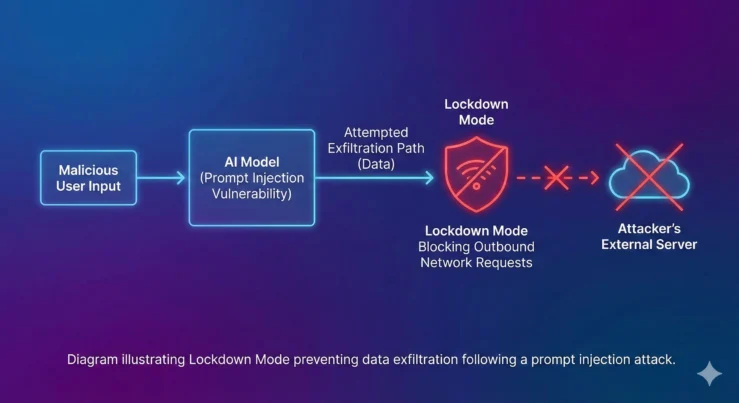
    ChatGPT Lockdown Mode Explained

    What Changes When You Turn It On

    Once enabled, ChatGPT behaves a bit more cautiously across the board.

    You can still do most of the basics:

    • Upload files
    • Share images
    • Generate AI images

    But certain features that rely on pulling content from the open web become more limited.

    For instance, ChatGPT may stop fetching certain images directly from the internet or showing them inline in your chat. The idea is simple — the less ChatGPT reaches out to unpredictable external sources, the smaller the chance something malicious sneaks through.

    OpenAI has also switched off two of its more powerful tools while Lockdown Mode is active:

    • Deep Research, which digs through multiple web sources to build detailed reports
    • Agent Mode, which lets ChatGPT take actions across websites and services on your behalf

    Both of these tools interact heavily with external content, which is exactly the kind of activity Lockdown Mode is designed to restrict.

    Who Actually Needs This

    Here’s the truth — most people probably won’t notice much difference in their day-to-day use, and that’s fine.

    OpenAI has been pretty upfront that this isn’t meant for everyone. If you’re using ChatGPT to draft emails, brainstorm ideas, or get quick answers to random questions, Lockdown Mode probably isn’t necessary for you.

    It’s built with a more specific audience in mind:

    • Professionals handling client or company data
    • Organisations working with confidential material
    • Researchers processing sensitive datasets
    • Journalists protecting sources and unpublished material
    • Anyone who regularly works with information that simply can’t afford to leak

    For people in these categories, giving up a bit of convenience in exchange for tighter security is usually an easy trade to make.

    Should You Turn It On?

    If your daily ChatGPT use revolves around casual tasks, you can likely skip this one without missing much.

    But if you’re someone who feeds sensitive documents into ChatGPT, works in a high-risk industry, or simply wants the peace of mind that comes with an extra layer of protection, Lockdown Mode is worth switching on.

    It’s not about distrust in ChatGPT itself. It’s about being realistic — the more AI tools get woven into our work and personal lives, the more attractive a target they become for people looking to exploit them.

    Also Read: Wear OS 7 Is Here: 7 Key Features Coming to Your Android Smartwatch

    This move from OpenAI reflects something happening across the entire AI industry right now. As these tools get smarter and more capable, the attack surface grows right along with them.

    Features like Deep Research and Agent Mode are powerful precisely because they reach beyond the chat window and interact with the wider internet. That power is also what makes them a bit riskier in certain contexts.

    Lockdown Mode is OpenAI’s way of giving users control over that trade-off. You decide how much convenience you’re willing to give up in exchange for extra safety.

    For most casual users, daily life with ChatGPT continues exactly as before. But for the people who genuinely need it, that second locked door could make all the difference.

    ChatGPT OpenAI
    Previous ArticleBalan Movie Review: Chidambaram Delivers Another Powerful Malayalam Masterpiece
    Next Article Baby Do Die Do Release Date: Inside Huma Qureshi’s Bold New Neo-Noir Thriller
    Mohan Nasre

      With over 2000 articles and blogs to his name for Flickonclick, Mohan Nasre is a versatile content writer skilled in multiple niches, including entertainment, technology, finance, news, lifestyle, fitness, and more. His dynamic writing style and ability to adapt to diverse topics have made him a go-to writer for high-quality, engaging content that resonates with readers across various industries.

      Related Posts

      Technology October 2, 2026Updated:October 2, 20264 Mins Read

      OpenAI DevDay 2026: What Actually Changes for Normal ChatGPT Users

      Technology September 20, 2026Updated:September 20, 20264 Mins Read

      Want Custom WhatsApp Stickers? ChatGPT Can Make Them for You Now

      Technology August 15, 2026Updated:August 15, 20267 Mins Read

      10 Best Independence Day 2026 AI Image Prompts for ChatGPT

      Technology June 22, 2026Updated:June 22, 20264 Mins Read

      OpenAI Launches Scheduled Tasks in ChatGPT: Here’s How AI Can Now Work Automatically

      Technology June 4, 2026Updated:June 4, 20264 Mins Read

      ChatGPT Younger Self Photo Trend Is Turning Old Memories Into Viral AI Art

      Smartphones March 23, 2026Updated:April 8, 20266 Mins Read

      OpenAI Desktop Super App: The Future of ChatGPT, Codex, and AI Browsing

      Startups February 9, 2026Updated:March 26, 20265 Mins Read

      Sarvam AI: India’s Sovereign AI Startup Transforming Indic Language Technology

      Technology February 3, 20265 Mins Read

      Codex by OpenAI: GPT-5-Powered AI Coding Tool That Is Transforming Software Development

      Latest Articles

      Indian Investors Claim Rs 100-Crore Loss After Stockal Sells US Shares Without Consent

      November 4, 2026

      Diwali 2026 Lakshmi Puja Muhurat: Best Time for Puja on November 8, City-Wise Timings

      November 4, 2026

      Jailer 2 May Come to OTT With 30 Extra-Minute Scenes Featuring Vijay Sethupathi

      November 4, 2026

      The Greatest Review: Jaalen Best Shines in Prime Video’s Muhammad Ali Series

      November 4, 2026

      Stick Season 2 Review: A 55-Year-Old Golfer, a Teen Star, and a Comeback Nobody Believes In, So Is It Still Worth Your Weekend?

      November 4, 2026

      Meesaya Murukku 2 OTT Release: Hiphop Tamizha Adhi’s Musical Drama Hits SonyLIV

      November 3, 2026

      How Did Jesús de Miguel Die? Watch Video of Tenerife Striker’s Collision With Andorra Goalkeeper

      November 3, 2026

      Jesús de Miguel Family: Meet His Partner María and Daughter Carla After the Tenerife Striker’s Tragic Death

      November 3, 2026

      Dandruff Home Remedies That Actually Work and How to Regrow Healthy Hair

      November 3, 2026

      North of North Season 2 Release Date: All You Need To Know Before You Return To Ice Cove

      November 3, 2026
      About Flickonclick

      Flickonclick brings you the latest updates across entertainment, lifestyle, tech, and more. Stay informed with trending news and stories that matter.

      Facebook X (Twitter) Instagram
      Latest Articles
      • Indian Investors Claim Rs 100-Crore Loss After Stockal Sells US Shares Without Consent
      • Diwali 2026 Lakshmi Puja Muhurat: Best Time for Puja on November 8, City-Wise Timings
      • Jailer 2 May Come to OTT With 30 Extra-Minute Scenes Featuring Vijay Sethupathi
      • The Greatest Review: Jaalen Best Shines in Prime Video’s Muhammad Ali Series
      Important Links
      • About Us
      • Advertise with Us
      • Contact Us
      • Cookie Policy
      • Disclaimer
      • Home
      • Privacy Policy
      • Terms & Conditions
      © 2026 Flickonclick. All Rights Reserved

      Type above and press Enter to search. Press Esc to cancel.