

Close Menu
FlickonclickFlickonclick
    Facebook X (Twitter) Instagram Pinterest
    FlickonclickFlickonclick
    Facebook X (Twitter) Instagram
    Contact Us
    • Home
    • Entertainment
    • Photos
    • Lifestyle
    • Wealth
    • News
      • Trending
      • Finance
      • Fitness
      • Technology
    • Biography Corner
    • More
      • About Us
      • Contact Us
      • Advertise with Us
      • Privacy Policy
      • Disclaimer
      • Terms & Conditions
      • Cookie Policy
    FlickonclickFlickonclick
    Home » Finance » How to Check Your ITR Refund Status Via PAN Card; Here is the Step by Step Process
    Finance

    How to Check Your ITR Refund Status Via PAN Card; Here is the Step by Step Process

    By Mohan NasreAugust 7, 2024
    Facebook Twitter WhatsApp Email
    How to Check Your ITR Refund Status Via PAN Card; Here is the Step by Step Process

    The Income Tax Department has started sending the refund amount to the accounts of taxpayers who filed income tax returns early. However, the refund of many people is still pending, while the refund of some people is also stuck due to errors in ITR filing 2024. In this article, we will tell you how to check your ITR refund from home with the help of PAN card. Actually, you can check the status of income tax refund through the National Security Depository (NSDL) website.
    How to Check Your ITR Refund Status Via PAN Card; Here is the Step by Step Process

    These things will be needed

    1. To check income tax refund online, you must have an ID and password to login to the e-filing portal
    2. To check the status of refund, your PAN card must be linked to Aadhaar.
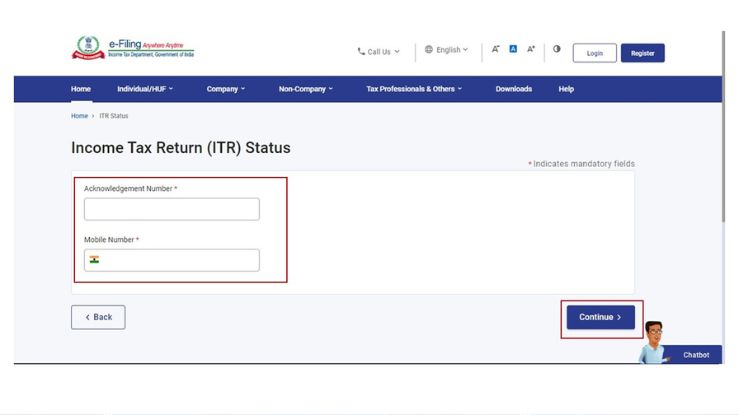
    3. You must have the acknowledgement number of the ITR filed.

    How to check ITR Refund Status with the help of PAN card

    • First of all, you have to login to the income tax e-filing portal incometax.gov.in with the help of ID and password.
    • After logging in to the web portal, click on ‘e-File’. After this, you have to do Income Tax Return and View Filed Return.
    • After this, you can check your refund status by selecting the assessment year.

    Also Read: ITR Filing 2024: What Will Happen If ITR is E-Verified After 30 Days? Know the Complete Details Here!

    How to check ITR refund status through NSDL website

    1. To check income tax refund status with the help of NSDL website, first of all you have to visit the NSDL website and select the assessment year.
    2. After this, you have to fill the captcha code and click on Proceed.
    3. After this your ITR refund will start showing.

    How many days does it take for ITR Refund to come?

    The most important thing to get income tax refund is to verify your online ITR return. Usually it takes 30 to 45 days for the ITR refund to arrive. If you have not received the refund, you should check your email to see if any information related to it has been given by the Income Tax Department.

    Income Tax
    Previous ArticleAmazon Great Freedom Festival Sale 2024: Massive Discounts on the Best Luggage Trolley Sets and More
    Next Article Heartbreak for India! Vinesh Phogat Disqualified for Just 100 Grams in Olympics
    Mohan Nasre

      With over 2000 articles and blogs to his name for Flickonclick, Mohan Nasre is a versatile content writer skilled in multiple niches, including entertainment, technology, finance, news, lifestyle, fitness, and more. His dynamic writing style and ability to adapt to diverse topics have made him a go-to writer for high-quality, engaging content that resonates with readers across various industries.

      Related Posts

      Venezuela Crisis: Why Is the Stock Market Rising?

      Read More

      How to Read Quarterly Results for the Stock Market in India

      Read More

      Big Shake-Up Ahead in Insurance Sector: PSU Merger and 100% FDI on the Cards

      Read More

      UPI Credit Line: Big Banks Set to Offer New Credit Facility

      Read More

      Why Your ITR Refund Is Delayed and How You Can Get Interest on It

      Read More

      IRB Wins 9270 Crore NHAI Project: Share Market May React Strongly

      Read More

      How to Get the Maximum Coverage at Minimum Premium on Four-Wheeler Insurance?

      Read More

      Smart Ways to Save Capital Gains Tax When Selling Your Property

      Read More
      Latest Articles

      From Paper Tickets to Digital Platforms: How Rail Travel Has Evolved in India

      January 7, 2026

      Russian Oil, Tariffs and Tension: Trump’s Strong Message for India

      January 7, 2026

      Venezuela Crisis: Why Is the Stock Market Rising?

      January 7, 2026

      Venezuela Oil Crisis Explained: Trump, China, and the Global Energy Game

      January 7, 2026

      Top Destination Wedding Venues in India with Estimated Costs

      January 7, 2026

      Women’s Property Rights in India: Rights of Daughters in Parents’ Property

      January 7, 2026

      Dhurandhar Creates History: First Hindi Film to Cross 800 Crore

      January 5, 2026

      IRCTC Launches Special Republic Day Dubai Tour Package for Indian Travellers

      January 5, 2026

      Ikkis Movie OTT Release: Date, Platform and Digital Rights Price

      January 4, 2026

      Wuthering Heights (2026) Cast Salary, Budget, and Film Details

      January 4, 2026
      About Flickonclick

      Flickonclick brings you the latest updates across entertainment, lifestyle, tech, and more. Stay informed with trending news and stories that matter.

      Facebook X (Twitter) Instagram
      Latest Articles
      • From Paper Tickets to Digital Platforms: How Rail Travel Has Evolved in India
      • Russian Oil, Tariffs and Tension: Trump’s Strong Message for India
      • Venezuela Crisis: Why Is the Stock Market Rising?
      • Venezuela Oil Crisis Explained: Trump, China, and the Global Energy Game
      Important Links
      • About Us
      • Advertise with Us
      • Contact Us
      • Cookie Policy
      • Disclaimer
      • Home
      • Privacy Policy
      • Terms & Conditions
      © 2025 Flickonclick. All Rights Reserved

      Type above and press Enter to search. Press Esc to cancel.