



Everyone selling you a broadband connection will show you the speed chart and the price tag. Nobody shows you what happens after you sign up and something goes wrong. That’s exactly the gap this article fills. Before you install Hathway internet, here’s the side of the story that doesn’t show up in the sales pitch.
This isn’t a rant. It’s a warning label, written so you know exactly what you’re walking into and how to protect yourself if you go ahead anyway.
My Personal Experience Installing Hathway
I installed Hathway internet, and here’s what I ran into.
The WiFi is genuinely one of the worst I’ve used. Not just “occasionally slow.” I mean drops without warning, speeds that swing wildly even at normal hours, and video calls that fall apart mid-conversation. If your work or daily life depends on a stable connection, this is the first thing you need to know.
Complaints don’t go anywhere. I raised issues through the proper channels and got silence. No callback, no update, no resolution timeline. The complaint just sits there, and you’re left checking your phone wondering if anyone even read it.
The people running the show don’t seem equipped to fix this. This isn’t about one bad technician having an off day. Both the support staff I dealt with and the overall way the company handles service requests point to a deeper problem — a lack of training and accountability at the level that actually decides how customers get treated.
I’m sharing this because if you’re about to install Hathway, you deserve to know this going in, not find out after you’ve paid the installation fee and signed a lock-in period.
What Other Users Are Reporting
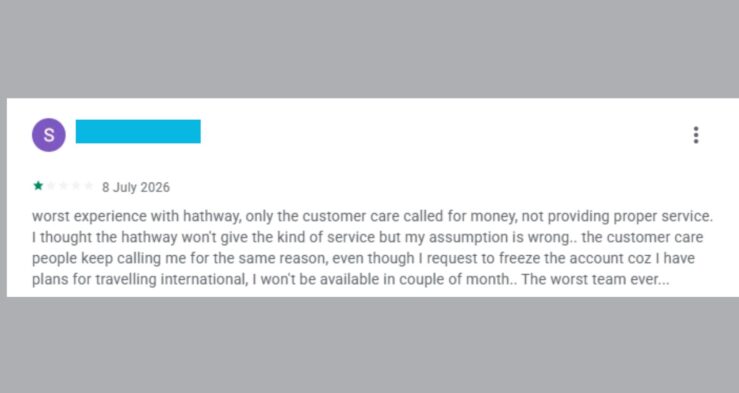
I went through recent hathway reviews to check if my experience was unusual. It isn’t. The same problems show up again and again.
The app exists to collect payment, not to solve problems. Multiple users describe the Hathway app as a maze of dropdown menus that lead nowhere useful. One user pointed out that the option to raise a technical complaint as a proper ticket has quietly vanished from the app over time — and suspects it was removed on purpose to cut down the number of visible service requests. The workaround people have found: call the IVRS and select “renewal help” instead of “technical support.” That’s the only way many users have managed to reach an actual human being.
Tickets get closed without being fixed. One user waited over six days, twice in two months, for a basic repair. On one occasion, the ticket was marked closed without the issue ever being resolved. Their conclusion, in their own words, was that you’re better off with a different provider entirely.
Installation promises don’t match installation reality. A new customer reported that installation was finished in the evening with a promise of activation within thirty minutes. Hours later, still nothing. No option in the app to flag it either.
WiFi calling and speed are consistently unreliable. One reviewer called the calling-over-WiFi feature barely functional and said the internet speed never matched what was promised, calling the whole decision to switch to Hathway a mistake.
Technicians show up late, then refuse to fix anything. One user waited two full days for a technician after logging a complaint, only to have the technician refuse to resolve the issue on the spot because he needed to inspect the router first — despite the user having been available for that exact inspection earlier when nobody showed up. That user cancelled the service entirely afterward.
Trying to cancel is its own battle. One customer requested discontinuation and instead of the request being processed, they got over a hundred calls pushing them to recharge instead. Getting through to someone about an actual network issue was described as nearly impossible, while the recharge reminder calls never stopped.
Hathway’s support team does respond to some of these reviews publicly, usually directing people to email their account details to the central helpdesk. Whether that turns into an actual fix seems to depend heavily on luck.
How to Complain on Hathway for the 100th Time (If You Already Have It)
If you already have Hathway and you’re stuck with a problem (for the 100th time), here’s the ‘actual path’ that supposedly works, based on what other users have miraculously survived:
- Skip the app for technical issues. It’s built around payments and renewals, not complaint resolution. Don’t waste time hunting for an option that likely isn’t there.
- Call and select the renewal/recharge option, not technical support. This routes you to a live person faster than any other path currently available.
- Email centralhelpdesk@hathway.net directly with your Customer Account ID, registered mobile number, and city. This is the channel Hathway’s own team responds through when replying to public complaints, so it’s a legitimate route.
- Use the official Contact Us page on hathway.com for listed helpline numbers if the email route stalls.
- Go public if you’re ignored. Posting your complaint on a review platform tends to get a faster response than private channels, based on the pattern across dozens of reviews.
- Document everything. Complaint dates, ticket numbers, technician visit times. If you ever need to escalate or push for a refund, this is your proof.
Before You Install: A Straight Answer
If you’re deciding whether to install Hathway, here’s the honest framework, no sugarcoating:
- If your building or area has genuinely no better alternative, Hathway might still work fine for you — service quality varies a lot by location, and not every user has a bad run.
- If you have other ISP options in your area, it’s worth comparing them first. Check recent reviews specifically for support responsiveness, not just speed and pricing.
- If you do go with Hathway, save the complaint steps above right now, before you need them. You will likely need them.
- Avoid long lock-in plans until you’ve tested the connection for at least a few weeks. A short trial period protects you if the service turns out to be unreliable in your specific area.
This is the kind of decision that’s easy to get wrong when you’re only looking at the price on the box. Knowing the actual support experience — not the marketing version — is what separates a good decision from a frustrating one.
Final Word
A broadband connection is a simple deal: you pay, you get internet, and if something breaks, someone fixes it without a fight. Based on what I went through and what a long list of other users are openly reporting, Hathway consistently struggles with that last part. The internet itself might work fine for you. The support system around it is where the real risk lies.
If you’ve installed Hathway recently or are dealing with an ongoing issue, drop your experience in the comments. It helps the next person make a more informed call before they sign up.