



If you use Google Chrome and haven’t checked your storage recently, there’s a good chance Google has quietly dropped a 4-gigabyte AI file onto your computer — without asking permission.
Resourceful users discovered a file approximately 4GB in size that Google silently installed on all machines running Google Chrome. It’s essentially part of a mass-distributed AI model that no one had the opportunity to decline.
The person who first brought this to widespread attention was security researcher Alexander Hanff, known online as ThatPrivacyGuy, and his findings quickly spread across Reddit, X, and Threads.
What Exactly Is This File?
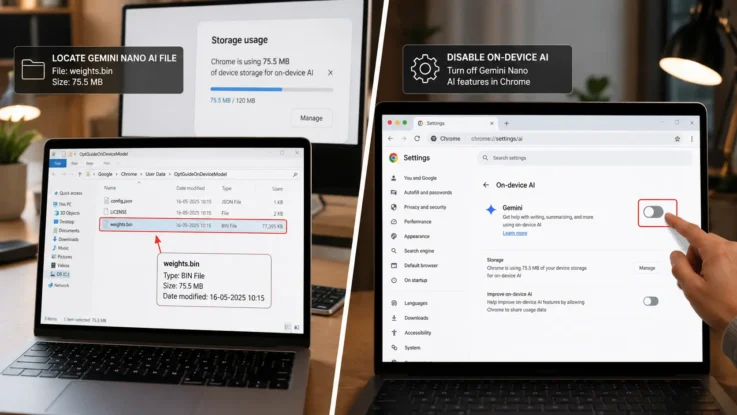
Google Chrome has been quietly downloading a 4GB AI model onto users’ devices without asking first. Chrome has been silently installing Gemini Nano, Google’s on-device AI model, as a file called weights.bin stored in the OptGuideOnDeviceModel directory within users’ Chrome profiles. This 4GB download happens automatically when Chrome determines your device meets the hardware requirements.
The weights file is part of Google’s new push for AI support features in the browser, such as “Help me Write” or the scam detection functionality. In other words, it’s the engine behind some of Chrome’s newer AI-powered tools — but the problem is that nobody was told it was being installed, and nobody got to say no.
What makes it worse is the self-reinstalling behaviour. If you discover the file and delete it, Chrome simply downloads it again. So just removing the file from your storage isn’t enough — the browser will pull it right back the next time it runs.
How Did This Get Discovered?
The researcher created a Chrome user data directory on April 23, 2026, to run an automated audit. The audit driver only interacted via Chrome DevTools Protocol — loading pages and capturing events — with zero keyboard or mouse input from a human at any point. Every AI mode surface in Chrome was untouched. By April 29, the profile contained 4GB of OptGuideOnDeviceModel weights. The file had appeared entirely on its own, with no human interaction at all.
The claim was found to be mostly true. The model — Google Gemini Nano — was found present on the computers of multiple employees across both MacOS and Windows systems. The 4GB file, called weights.bin, was located in a folder called OptGuideOnDeviceModel in Google Chrome’s user data folder.
Why This Is a Problem
The real issue here isn’t the 4GB file itself but how Google downloaded it on systems without explicit user approval. This sets a bad precedent. Four gigabytes is not a small download. For someone on a metered internet connection, on a laptop with limited storage, or simply someone who expects to know what software is being installed on their own device, this is a genuinely significant issue.
Google’s response has been fairly standard — the company says Chrome only downloads the file when there is sufficient storage space on the device, and that it is used for security-related functions. But the absence of a consent screen or notification has left many users and privacy advocates frustrated.
How to Actually Remove It
Don’t just delete the file — disable the functionality that’s responsible for it. This also means that features that rely on On-device AI, like writing or rephrasing text and scam detection, will stop working.
Here’s how to do it properly:
Open Chrome and type chrome://settings in the address bar. From there, navigate to Privacy and Security, then look for On-device AI or AI-related settings and toggle them off. Once that setting is disabled, you can then go and manually delete the weights.bin file from the OptGuideOnDeviceModel folder in your Chrome user data directory without Chrome re-downloading it.
In February 2026, Google began rolling out the ability for users to easily turn off and remove the model directly in Chrome settings. All Snopes employees were able to remove the files from their devices using that opt-out option, and the files remained deleted. That said, the setting may not yet be available for every user depending on their Chrome version.
To re-download the Gemini Nano model, simply re-enable the On-device AI setting. The download may take some time depending on your internet speed.
Also Read: Samsung and Google Just Revealed Their Smart Glasses at Google I/O 2026
This isn’t just about one file on one browser. It reflects a broader shift happening across the tech industry — AI models are getting smaller and more efficient, and companies are increasingly pushing them directly onto user devices to power local features without sending data to the cloud.
That’s not necessarily a bad thing in principle. On-device AI can be faster and more private than cloud-based processing. But the way Google went about it — silently, at 4GB, with a self-reinstalling mechanism — is exactly the kind of behaviour that erodes user trust. A simple notification or opt-in prompt would have made all the difference.
Similar Read: ChatGPT Younger Self Photo Trend Is Turning Old Memories Into Viral AI Art
For now, if storage space matters to you or you simply want control over what lives on your own computer, the Chrome settings route is the cleanest way to handle it.