

Close Menu
FlickonclickFlickonclick
    Facebook X (Twitter) Instagram Pinterest
    FlickonclickFlickonclick
    Facebook X (Twitter) Instagram
    Contact Us
    • Home
    • Entertainment
      • OTT
        • Amazon Prime Video
        • Amazon miniTV
        • Amazon MX Player
        • JioHotstar
        • Netflix
        • ShemarooMe
        • SonyLiv
        • ULLU App
        • Zee5
      • Reviews
        • Movie Reviews
        • Web Series Review
      • Cast Salary & Budget
      • Music
      • Box Office Collection
      • Celebrity
        • Biography Corner
        • Photos
        • Wealth
    • Lifestyle
      • Dating & Relationships
      • Fashion
      • Product Reviews
      • Travel
      • Food
      • Fitness
    • Technology
      • Smartphones
    • Finance
      • Cryptocurrency
      • Startups
    • Sports
    • Latest News
      • India
      • Global
      • Trending
    • More
      • About Us
      • Advertise with Us
      • Contact Us
      • Privacy Policy
      • Disclaimer
      • Cookie Policy
    FlickonclickFlickonclick
    Home » Technology » ChatGPT Comes to WhatsApp- A Step-by-Step Guide
    Technology

    ChatGPT Comes to WhatsApp- A Step-by-Step Guide

    By Virat VermaDecember 21, 2024
    Facebook Twitter WhatsApp Email
    ChatGPT Comes to WhatsApp- A Step-by-Step Guide

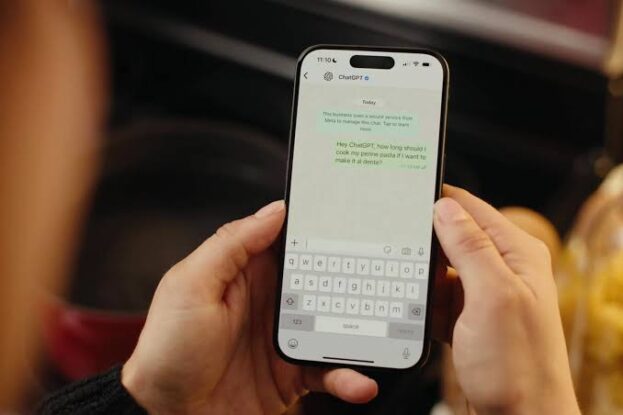
    OpenAI’s ChatGPT is now accessible on WhatsApp, making it easier than ever to interact with the AI-powered chatbot. This new integration eliminates the need to open a separate app or website, allowing users to chat directly within WhatsApp. Setting it up is simple and user-friendly. Here’s how you can get started:

    Steps to Access ChatGPT on WhatsApp:

    1. Scan the QR Code:
      • Locate the QR code provided in the image below or visit OpenAI’s official website to find it.
    2. Start Chatting:
      • After scanning the QR code, you’ll be redirected to WhatsApp to begin your conversation with ChatGPT.

    Verify the Official Account:

    To ensure you’re interacting with the authentic ChatGPT account, check for:

    • Blue Verification Badge: The official account has a blue tick next to its name.
    • Official Phone Number: The number linked to ChatGPT is 1-800-242-8478.

    Once verified, you can start chatting by typing your questions or requests, and ChatGPT will respond instantly.

    Add Flickonclick as the preferred Google News source

    Also Read- WhatsApp Hack: How Does WhatsApp Get Hacked Despite Tight Security?

    What Can You Do with ChatGPT on WhatsApp?

    Using ChatGPT on WhatsApp feels like chatting with a friend. It can assist with:

    • Answering specific questions.
    • Offering writing help.
    • Providing general information and recommendations.

    Limitations to Keep in Mind:

    • Free Usage with Daily Limits:
      • The integration is free, but there are daily limits on the number of messages you can send. Notifications will alert you if you reach these limits.
    • No Paid Account Linking:
      • Currently, ChatGPT Plus accounts cannot be linked to WhatsApp. For premium features, you’ll need to use the ChatGPT app or website.

    Powered by GPT-4o Mini Model:

    The WhatsApp version of ChatGPT operates on the GPT-4o mini model, offering fast and reliable responses. While slightly scaled down compared to the full GPT-4 model, it efficiently handles a wide range of queries and tasks.

    For now, this integration is a great way to access ChatGPT directly through WhatsApp, providing convenience and ease of use for casual interactions or experimenting with AI tools.

    ChatGPT WhatsApp
    Previous ArticleWhatsApp Introduces New Effects, Stickers, and Features for New Year—Details Inside
    Next Article Pushpa 2 OTT Release: ‘Pushpa 2’ Will Not Release on OTT on January 9, Fans to Wait for 56 More Days
    Virat Verma

      As Senior Head Writer at Flickonclick, he specializes in news coverage across entertainment, sports, and trending topics. With years of experience in digital journalism, he focuses on delivering timely and accurate stories that are easy to understand. His approach to writing is straightforward—breaking down complex news into clear, engaging content that keeps readers informed. Whether it's breaking entertainment updates, sports highlights, or trending headlines, he ensures every article is well-researched and reader-friendly.

      Related Posts

      Smartphones March 23, 2026Updated:April 8, 20266 Mins Read

      OpenAI Desktop Super App: The Future of ChatGPT, Codex, and AI Browsing

      Startups February 9, 2026Updated:March 26, 20265 Mins Read

      Sarvam AI: India’s Sovereign AI Startup Transforming Indic Language Technology

      Technology January 28, 2026Updated:January 29, 20264 Mins Read

      ChatGPT Prism: OpenAI’s New AI Workspace for Scientific Research Paper Writing

      Technology January 8, 20262 Mins Read

      WhatsApp Brings Major New Year Updates to Improve User Experience

      Technology December 16, 20254 Mins Read

      10 Prompts on ChatGPT to Avoid AI Detection in Your Articles

      Technology April 14, 20253 Mins Read

      From Online Indicator to Document Scanner: 12 New Features Added to WhatsApp

      Technology April 8, 20252 Mins Read

      Is ChatGPT Stealing Your Data Through Ghibli Art? Here’s What the AI Chatbot Had to Say

      Technology March 8, 20252 Mins Read

      WhatsApp Rolls Out 5 New Features, Changing the Chatting Experience

      Latest Articles

      Who is Prabhsimran Singh? The Explosive Opener Powering PBKS Recent Success

      April 25, 2026

      KL Rahul Smashes 152* to Register the Highest Individual Score by an Indian in IPL History

      April 25, 2026

      Daadi Ki Shaadi: Everything About Neetu Kapoor and Kapil Sharma’s Upcoming Film

      April 25, 2026

      Rakesh Bedi Dhurandhar Bonus Controversy — Actor’s Team Denies ₹1 Crore Claim

      April 25, 2026

      Michael Movie Review: Jaafar Jackson Delivers, But the Story Feels One-Dimensional

      April 25, 2026

      Ginny Wedss Sunny 2 Movie Review: A Familiar Rom-Com That Struggles to Find Its Spark

      April 24, 2026

      Who is Danish Malewar? All You Need to Know About Mumbai Indians’ Young Vidarbha Batter

      April 24, 2026

      From MI Hero to CSK Replacement: Akash Madhwal’s IPL 2026 Comeback Story

      April 24, 2026

      Sapne vs Everyone Season 2 Release Date on Prime Video: When to Watch the TVF Drama

      April 24, 2026

      7 Japanese Horror Movies on Netflix That Will Terrify You Instantly and Keep You Awake at Night

      April 23, 2026
      About Flickonclick

      Flickonclick brings you the latest updates across entertainment, lifestyle, tech, and more. Stay informed with trending news and stories that matter.

      Facebook X (Twitter) Instagram
      Latest Articles
      • Who is Prabhsimran Singh? The Explosive Opener Powering PBKS Recent Success
      • KL Rahul Smashes 152* to Register the Highest Individual Score by an Indian in IPL History
      • Daadi Ki Shaadi: Everything About Neetu Kapoor and Kapil Sharma’s Upcoming Film
      • Rakesh Bedi Dhurandhar Bonus Controversy — Actor’s Team Denies ₹1 Crore Claim
      Important Links
      • About Us
      • Advertise with Us
      • Contact Us
      • Cookie Policy
      • Disclaimer
      • Home
      • Privacy Policy
      • Terms & Conditions
      © 2026 Flickonclick. All Rights Reserved

      Type above and press Enter to search. Press Esc to cancel.