

Close Menu
FlickonclickFlickonclick
    Facebook X (Twitter) Instagram Pinterest
    FlickonclickFlickonclick
    Facebook X (Twitter) Instagram
    Contact Us
    • Home
    • Entertainment
    • Photos
    • Lifestyle
    • Wealth
    • News
      • Trending
      • Finance
      • Fitness
      • Technology
    • Biography Corner
    • More
      • About Us
      • Contact Us
      • Advertise with Us
      • Privacy Policy
      • Disclaimer
      • Terms & Conditions
      • Cookie Policy
    FlickonclickFlickonclick
    Home » News » No Driving Licence in Your Pocket? Here’s the Trick to Avoid a Fine – Most People Don’t Know This!
    News

    No Driving Licence in Your Pocket? Here’s the Trick to Avoid a Fine – Most People Don’t Know This!

    By Virat VermaJuly 2, 2025
    Facebook Twitter WhatsApp Email
    Challan

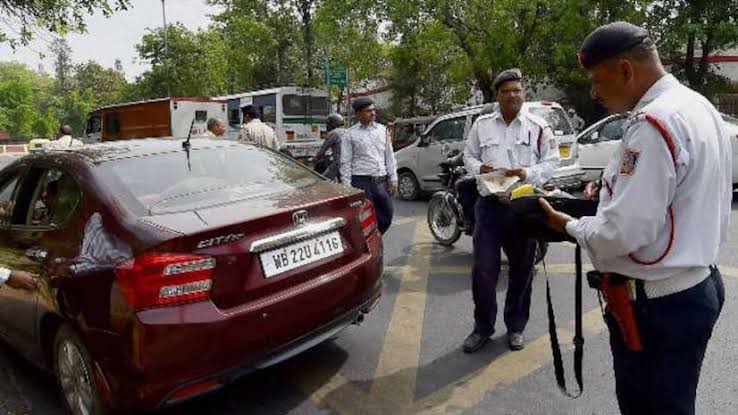
    Did you know that you can avoid a traffic fine even if you’re not carrying a physical driving licence? Thanks to the Digital India initiative, the Government of India has made it possible to go paperless for various driving-related documents. Now, while driving, you no longer need to carry hard copies of your Driving Licence, Registration Certificate (RC), or insurance papers. Instead, you can show them digitally using the DigiLocker or mParivahan app—both of which are legally valid.

    What Do the Traffic Rules Say?

    According to the Ministry of Road Transport and Highways (MoRTH), digital documents stored in DigiLocker or the mParivahan app are considered as legally valid as physical documents. So if a traffic officer stops you and asks for your documents, you can present your licence or RC through these apps, and it will be accepted under the law.

    Using the DigiLocker App

    DigiLocker is a secure digital platform developed by the Government of India, where you can store official documents like Driving Licence, Aadhaar Card, PAN Card, mark sheets, etc. The app links with your mobile number and Aadhaar for verification.

    How to Add Your Driving Licence in DigiLocker:

    1. Download the DigiLocker app from Google Play Store or App Store.
    2. Sign up or log in.
    3. Go to the “Issued Documents” section.
    4. Select “Ministry of Road Transport and Highways.”
    5. Choose Driving Licence or Vehicle Registration (RC).
    6. Enter the required details like licence number and date of birth.
    7. The document will be automatically added to your DigiLocker account.

    Also Read-: How to obtain Driving License without visiting the RTO?

    Using the mParivahan App

    The mParivahan app is launched by MoRTH and helps you access vehicle details and verify driving licences digitally.

    How to Add Your DL in mParivahan:

    1. Download the mParivahan app.
    2. Go to the “DL Dashboard.”
    3. Enter your Driving Licence number and search.
    4. Your details will appear on the screen.
    5. Click on “Add to Dashboard.”
    6. The app will now store your digital DL securely.

    How These Apps Help You Avoid a Fine

    Even if you’re not carrying physical documents, showing verified digital documents via these apps is completely valid. The traffic officer can scan the QR code provided in the app to confirm its authenticity. Keep in mind, photos or PDFs of documents are not considered valid, but documents fetched from DigiLocker or mParivahan are accepted because they’re linked directly to government databases.

    Important Points to Remember:

    • Always show Issued or Verified documents in the app—not just uploaded photos.
    • Your phone must have enough battery and an internet connection for the app to function.
    • Let the traffic police scan and verify the documents directly from the app.

    By following this method, you can drive tension-free without carrying physical documents and still be legally compliant.

    Driving License
    Previous ArticleSuniel Shetty Charging the Lowest Fee for Hera Pheri 3 – Here’s What Akshay Kumar and Paresh Rawal Are Earning
    Next Article 3 Symptoms of Vitamin D Deficiency That Appear Only at Night, and 7 Things That Can Help Prevent It
    Virat Verma

    As Senior Head Writer at Flickonclick, he specializes in news coverage across entertainment, sports, and trending topics. With years of experience in digital journalism, he focuses on delivering timely and accurate stories that are easy to understand. His approach to writing is straightforward—breaking down complex news into clear, engaging content that keeps readers informed. Whether it's breaking entertainment updates, sports highlights, or trending headlines, he ensures every article is well-researched and reader-friendly.

    Related Posts

    Railway Group D Recruitment 2026: Online Application Process Delayed, Check New Schedule

    Read More

    New Train Ticket Cancellation Rules 2026: Indian Railways Issues Major Update

    Read More

    Akshay Kumar’s Escort Car Meets With Accident in Mumbai’s Juhu; Two Injured | WATCH VIDEO

    Read More

    5-Day Dry Spell in Delhi: Check the Dates When Liquor Sale Will Be Prohibited

    Read More

    Trump Triggers Trade War Over Greenland, Slaps Tariffs on Eight European Nations

    Read More

    Indian Embassy in Tel Aviv Issues Advisory for Indian Nationals Amid Israel Tensions

    Read More

    Maharashtra Municipal Corporation Elections: 68 Candidates Win Unopposed Before Vote Counting

    Read More

    10th Pass Can Get RBI Job! 572 Vacancies, Salary Up to 46000

    Read More
    Latest Articles

    Why Every Business Needs a Technical SEO Agency

    January 22, 2026

    Severe Solar Radiation Storm Explained: What the January 2026 S4 Event Means for Earth

    January 22, 2026

    The 50 Reality Show India Contestants List (Confirmed So Far): Full Lineup, Format & Latest Updates

    January 22, 2026

    Beyond the Red Lehenga: 5 Non-Traditional Bridal Lehenga Colors Making a Bold Statement in 2026

    January 21, 2026

    Border 2 OTT Platform and Release Date: Where & When to Watch Sunny Deol’s War Epic Online

    January 21, 2026

    Dhurandhar 2 Release Date Confirmed: Will Ranveer Singh’s Film Clash With Yash’s Toxic on 19 March 2026?

    January 21, 2026

    Škoda Kushaq Facelift 2026 Launched in India: Price, Features, Safety & Engine Details

    January 20, 2026

    Who is Deeya Yadav? 16 Year Old DC Women Sensation Hailed by Jemimah Rodrigues

    January 20, 2026

    How Cryptocurrency Platforms Are Changing Online Entertainment: A Gambling Industry Revolution

    January 20, 2026

    Top 10 Hottest Bengali Movies to Watch Online

    January 20, 2026
    About Flickonclick

    Flickonclick brings you the latest updates across entertainment, lifestyle, tech, and more. Stay informed with trending news and stories that matter.

    Facebook X (Twitter) Instagram
    Latest Articles
    • Why Every Business Needs a Technical SEO Agency
    • Severe Solar Radiation Storm Explained: What the January 2026 S4 Event Means for Earth
    • The 50 Reality Show India Contestants List (Confirmed So Far): Full Lineup, Format & Latest Updates
    • Beyond the Red Lehenga: 5 Non-Traditional Bridal Lehenga Colors Making a Bold Statement in 2026
    Important Links
    • About Us
    • Advertise with Us
    • Contact Us
    • Cookie Policy
    • Disclaimer
    • Home
    • Privacy Policy
    • Terms & Conditions
    © 2025 Flickonclick. All Rights Reserved

    Type above and press Enter to search. Press Esc to cancel.