


Global campaigns don’t fail because the product is wrong. They fail because the message doesn’t travel.
A video that performs beautifully in one region can feel confusing-or even risky in another, simply because the on-screen text is locked to a single language, culture, or context. In an instant, your most polished asset becomes unusable the moment you cross a border.
That’s why international marketing teams are shifting how they build and reuse video. And when those visuals are planned up front often with the help of an AI storyboard generator localization becomes a layer you add, not a wall you hit.

Let’s dive deeper into how removal of embedded text makes the videos brand-safe and globally reusable.
When language becomes a liability rather than a bridge
The words seem harmless until they’re not.
Embedded captions, slogans, or calls to action could:
- Exclude audiences who don’t speak the language
- Misfire culturally when translated literally
- Violate regional advertising norms
- Clash with local brand tone
What may work in one market might confuse and offend in another. But it’s not scalable to have to re-shoot all the videos.
The answer is not less localization, but better foundations.
Visual-first storytelling crosses borders much more easily than words
Images, motion, and emotion travel more easily across borders than text.
A smile, a gesture, a product in use are these not immediate forms of communication that transcend language barriers? This is why some of the most successful global campaigns lead with images and not words.
When the text is embedded inside the frame, it locks the interpretation at a particular spot. Some interpretation can be accommodated in the standalone visuals. That is why many global teams now begin to strip out the language-specific aspects early enough in the process to allow the same video to support several markets.
Brand safety begins with being neutral
Localization is not translation; it is risk management.
How embedded text contributes to brand risk
- Translation mistakes impair credibility
- Outdated disclaimers fail to comply with
- Slogans have unintended meanings
- Font styles may not support certain scripts
However, risks are greatly reduced by stripping out the fixed text. Instead, you are message layering around the video, not editing the video for each region.
This is a quicker and more secure way to achieve global uniformity.
The localization scalability mindset
World-class global teams operate on multiple levels.
- Core visual asset – clean, text-free, globally usable
- Localized messaging – captions, overlays, voiceovers per region
- Platform adaptation – native tools for each channel
However, for such a strategy to prove effective, the underlying video needs to remain flexible. Hence, why teams have chosen to eliminate text from their video resources before launching them globally. Master. Multiple markets. No trade-offs.
When one video needs to speak ten languages
Now, consider running this campaign in five different regions. If your video features embedded text in English:
- Each market requires a unique edit
- Approvals
- Timelines
- Costs
But where the video is visually neutral:
- There is the addition of text
- Captions are in accordance with
- Platforms support languages inherently
In reality, the process of global distribution becomes efficient rather than exhaustive.
And when subjects are isolated or when backgrounds are relit sometimes using a transparent background maker videos are easily adaptable to region-specific design requirements.
Pippit – building brand-safe visuals
This is how teams are leveraging this tool to transform language-locked video assets into globally flexible assets. The localization-friendly reset helps you save time and build trust. This action removes hidden texts and readies videos for global redistribution, without reshooting.
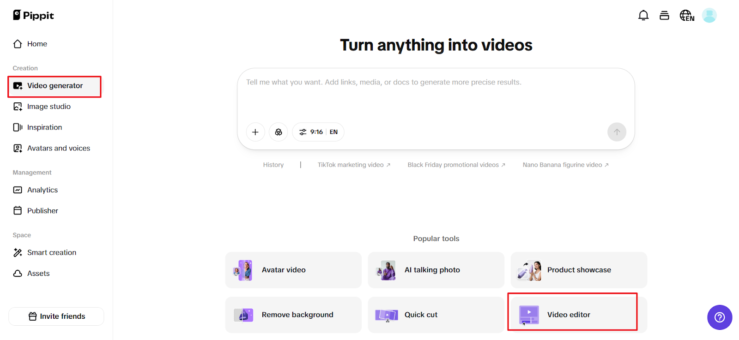
Step 1: Open the video editor
To remove text from video AI for free, you need to sign up for with your Google, TikTok, or Facebook login. After that, click either Video Generator or Smart Tools in the left corner and pick Video editor.
Drag and drop your file to the working area, or click Click to Upload to upload it from your computer. This is your master file the one you will send.
Step 2: Remove text from video
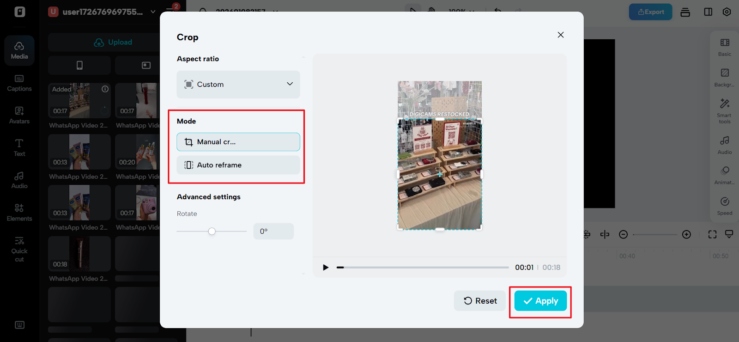
Now, open Smart Tools and choose Auto Reframe. Select the correct aspect ratio and either Manual Crop or Auto Reframe, and click Apply. This will reframe the video to remove embedded captions, slogans, watermark, etc., while holding the subject at the center.
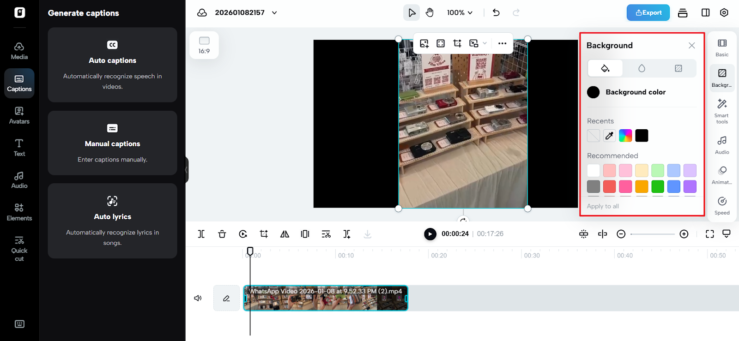
To remove the background, if the text is on the background layer, click on the background to remove it, ensuring the remove background feature is on for the removal of the background. To add the background color, go to background, while for images, go to elements.
This removes meaning specific to the words in the language and leaves a clean, flexible graphic.
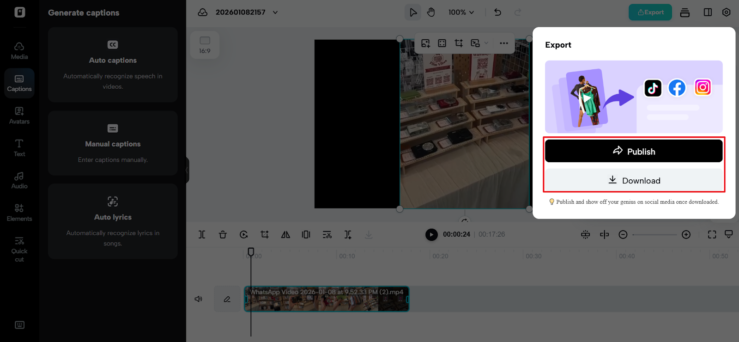
Step 3: Export & share video
When that video is brand-safe and rendered as a neutral video, click on “Export” located at the top right of the page. Select “Publish/Download,” determine your export options, and click “Export” again.
You now have a localizable asset that can be combined with local messaging anywhere globally.
How global teams use clean visuals
After resetting the video, teams usually:
- Add captions in local languages per market
- Adjust CTA buttons to regional regulation requirements
- Use the same visuals in all campaigns
- Carry out brand consistency without copying
- Remove text from video
The result is quicker launches, fewer mistakes, and a more seamless global footprint.
Global reach begins with clean foundations
Localization should not be a process of rebuilding, but adapting.
Brands using Pippit break the barrier of understanding at the visual level to create content that is safe, flexible, and adaptable to all regions. The meaning is locked into a specific language, whereas with Pippit, the regions have the liberty to communicate with their audience.
If your videos are holding you back in terms of global reach, it’s not because you need more versions. It is a better starting point.