


Everyone talks about ChatGPT. And yes, it can generate images now. But here’s the thing — it’s not the best tool for the job. Not even close.
The AI image generation space has exploded in the past two years, and there are tools out there that are faster, more specialized, more accurate, and, frankly, more impressive than anything ChatGPT produces visually. Whether you’re a graphic designer, a content creator, a marketer, or just someone who wants to bring an idea to life without picking up a paintbrush, there’s a tool built specifically for what you need.
Here are the 7 best AI image generation tools in 2026 — other than ChatGPT — broken down honestly by what they do best, who they’re for, and what they actually cost.
Table of Contents
What Makes a Good AI Image Generator?
Before the list, here’s what separates genuinely useful tools from gimmicks:
- Output quality — Does it actually look good, or does it produce the blurry, distorted images that give AI art a bad reputation?
- Prompt accuracy — Does it do what you asked, or does it hallucinate random details?
- Customisation — Can you control the style, resolution, and composition?
- Commercial rights — Can you actually use the images for work without legal grey areas?
- Price vs. output — Are you getting value for what you spend?
With that framework in mind, let’s get into it.
Looking Beyond ChatGPT? Try These 7 AI Image Generation Tools
1. Midjourney — Best for Artistic Quality
Price: From $10/month (~200 images + commercial rights) Access: Web app, Discord Made by: Midjourney
If you’ve seen a stunning AI-generated image floating around the internet and thought “how did someone make that?” — there’s a very good chance it came from Midjourney. It produces the most visually striking, artistically rich outputs of any tool on this list, with a distinctive aesthetic that sits somewhere between digital painting and high-end concept art.
Midjourney runs on Discord, which feels quirky at first but becomes second nature quickly. You type a prompt, the bot generates four variations, and you can upscale or remix from there. The web app has improved significantly and is now a viable alternative for those who don’t want to use Discord.
The $10/month entry plan gives you roughly 200 images and commercial usage rights — making it genuinely accessible for creators and small businesses. For those who need more volume, higher tiers are available.
Best for: Artists, illustrators, content creators, anyone who prioritises visual quality over clinical accuracy.
2. Adobe Firefly — Best for Professional Design Workflows
Price: Limited free credits; from $9.99/month for 2,000 credits Access: firefly.adobe.com, Photoshop, Express, and other Adobe tools Made by: Adobe
Adobe Firefly is the tool that makes the most sense for professionals already working inside the Adobe ecosystem. The reason is simple — it’s embedded directly into Photoshop, Express, and other Adobe applications. You don’t need to generate an image separately and import it. You generate it right inside the workflow.
Firefly is also notable for being trained on licensed and Adobe Stock content, which means the images it produces are commercially safe to use — a significant advantage in professional and agency settings where copyright matters enormously.
The generative fill and expand features inside Photoshop are powered by Firefly and have become genuinely indispensable for retouching and compositing work. It’s not the most creatively expressive tool on this list, but for practical, production-ready professional work it’s hard to beat.
Best for: Designers, marketers, and photographers already using Adobe Creative Cloud.
3. Ideogram — Best for Text Accuracy in Images
Price: Limited free plan; from $20/month for 1,000 priority credits Access: Web app Made by: Ideogram AI
One of AI image generation’s most persistent and embarrassing weaknesses has always been text. Ask most tools to put words inside an image and you’ll get garbled, misspelled nonsense that makes the whole thing unusable. Ideogram was built specifically to solve that problem.
If your use case involves generating images with readable text — posters, social media graphics, merchandise mockups, typographic artwork — Ideogram is the clear choice. It handles text within images with a level of accuracy that other tools simply don’t match. The overall image quality is strong too, making it more than a one-trick tool.
Best for: Social media creators, marketers, anyone who needs legible text inside generated images.
4. FLUX — Best for Customisation and Control
Price: Depends on platform Access: NightCafe, Tensor.Art, Civitai, and other platforms; API; local server Made by: Black Forest Labs
FLUX is the tool for users who want to go deep. Rather than a standalone consumer app, FLUX is a model — developed by Black Forest Labs — that powers dozens of third-party platforms and can be run locally on your own hardware if you have the setup for it.
This flexibility is FLUX’s defining feature. You can fine-tune the model, run custom workflows, integrate it via API, or experiment with community-created versions across platforms like Civitai and Tensor.Art. The output quality is excellent — photorealistic, detailed, and responsive to complex prompts.
For power users, developers, and creatives who want full control over their image generation pipeline, FLUX is in a category of its own.
Best for: Developers, advanced users, and creators who want deep customisation and technical control.
5. Leonardo.Ai — Best for Creative Control and Consistency
Price: Free tier available; paid plans from around $12/month Access: Web app Made by: Leonardo.Ai
Leonardo.Ai has built a strong following among game developers, concept artists, and digital creators who need to produce visually consistent outputs across multiple images. The platform offers a rich set of controls — model selection, image guidance, canvas tools, and the ability to train custom models on your own visual style.
That last feature — custom model training — is what separates Leonardo from most consumer-facing tools. If you’re building a game and need every character to share a consistent visual identity, or running a brand that requires a signature aesthetic across all AI-generated content, Leonardo gives you the tools to make that happen.
Best for: Game developers, concept artists, and brands needing visual consistency across multiple outputs.
6. Recraft — Best for Graphic Design
Price: Free for 30 credits/day; from $12/month for full features Access: Web app Made by: Recraft
Recraft occupies a unique position on this list — it’s the most design-forward tool here, built with graphic designers specifically in mind rather than fine artists or photographers. It generates vector-style illustrations, icons, and design assets that slot directly into professional design work without looking like generic AI output.
The free tier is genuinely useful — 30 credits daily gives you meaningful daily access without paying anything. The interface is clean and intuitive, and the outputs have a polished, intentional quality that makes them immediately usable in real projects.
Best for: Graphic designers, UI/UX designers, and brand teams who need clean, design-ready assets.
7. Reve — Best for Prompt Accuracy
Price: Limited free plan; Pro at $20/month Access: Web app Made by: Reve
Reve is the newest entrant on this list and the one generating the most buzz among prompt-focused creators. Its core differentiator is simple: it does what you actually asked. Where other tools frequently interpret prompts loosely — adding elements you didn’t request, ignoring specific details, or changing the composition entirely — Reve follows instructions with unusual fidelity.
For creators who write detailed, specific prompts and have been frustrated by tools that ignore half of what they specify, Reve is a revelation. The Pro plan at $20/month adds more generations and private image options, making it viable for professional use.
Best for: Detail-oriented creators and professionals who write specific, complex prompts and need them followed precisely.
Also Read: 5 Best Text to Video AI Tools for SmarterVideo Creation in 2026
Side-by-Side Comparison
| Tool | Best For | Price From | Access |
|---|---|---|---|
| Midjourney | Artistic quality | $10/month | Web, Discord |
| Adobe Firefly | Professional design workflows | $9.99/month | Adobe apps + web |
| Ideogram | Text accuracy in images | $20/month | Web app |
| FLUX | Customisation and control | Platform-dependent | Multiple platforms, API |
| Leonardo.Ai | Creative consistency | ~$12/month | Web app |
| Recraft | Graphic design assets | $12/month | Web app |
| Reve | Prompt accuracy | $20/month | Web app |
How to Choose the Right Tool
Choosing the right AI image generator depends on your goals. Midjourney is a great option for those focused on artistic visuals, while Adobe Firefly is ideal for professional design workflows.
For beginners, tools like Recraft and Ideogram offer simplicity and ease of use. Advanced users may prefer FLUX for its customization capabilities and flexibility.
The Future of AI Image Generation
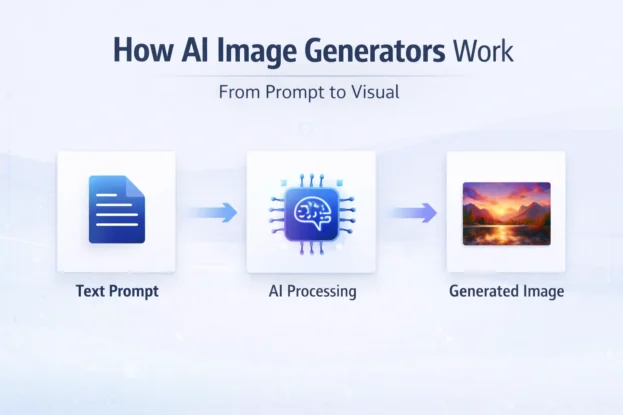
AI image generation is evolving rapidly, with tools becoming more accurate and creative. Features such as real-time editing, improved prompt understanding, and higher-resolution outputs are shaping the future.
As competition grows, these tools will continue to improve, offering more control and better integration with other platforms. This makes it an exciting time for creators exploring AI-powered design.
A Creative Shift You Shouldn’t Ignore
AI image tools are no longer just experimental technologies. They are becoming essential tools for creators, businesses, and marketers who want to stay ahead.
Exploring these platforms can unlock new creative possibilities and help you produce high-quality visuals faster than ever before.