

Close Menu
FlickonclickFlickonclick
    Facebook X (Twitter) Instagram Pinterest
    FlickonclickFlickonclick
    Facebook X (Twitter) Instagram
    Contact Us
    • Home
    • Entertainment
      • OTT
        • Amazon Prime Video
        • Amazon miniTV
        • Amazon MX Player
        • JioHotstar
        • Netflix
        • ShemarooMe
        • SonyLiv
        • ULLU App
        • Zee5
      • Reviews
        • Movie Reviews
        • Web Series Review
      • Cast Salary & Budget
      • Music
      • Box Office Collection
      • Celebrity
        • Biography Corner
        • Photos
        • Wealth
    • Lifestyle
      • Dating & Relationships
      • Fashion
      • Product Reviews
      • Travel
      • Food
      • Fitness
    • Technology
      • Smartphones
    • Finance
      • Cryptocurrency
      • Startups
    • Sports
    • Latest News
      • India
      • Global
      • Trending
    • More
      • About Us
      • Advertise with Us
      • Contact Us
      • Privacy Policy
      • Disclaimer
      • Cookie Policy
    FlickonclickFlickonclick
    Home » Technology » Brand-Safe Visuals: Removing Embedded Text to Localize Videos For Global Audiences
    Technology

    Brand-Safe Visuals: Removing Embedded Text to Localize Videos For Global Audiences

    By Vanya MalhotraJanuary 12, 2026
    Facebook Twitter WhatsApp Email
    Brand-Safe Visuals: Removing Embedded Text to Localize Videos For Global Audiences

    Global campaigns don’t fail because the product is wrong. They fail because the message doesn’t travel.

    A video that performs beautifully in one region can feel confusing-or even risky in another, simply because the on-screen text is locked to a single language, culture, or context. In an instant, your most polished asset becomes unusable the moment you cross a border.

    That’s why international marketing teams are shifting how they build and reuse video. And when those visuals are planned up front often with the help of an AI storyboard generator localization becomes a layer you add, not a wall you hit.

    Let’s dive deeper into how removal of embedded text makes the videos brand-safe and globally reusable.

    When language becomes a liability rather than a bridge

    The words seem harmless until they’re not.

    Embedded captions, slogans, or calls to action could:

    • Exclude audiences who don’t speak the language
    • Misfire culturally when translated literally
    • Violate regional advertising norms
    • Clash with local brand tone

    What may work in one market might confuse and offend in another. But it’s not scalable to have to re-shoot all the videos.

    The answer is not less localization, but better foundations.

    Visual-first storytelling crosses borders much more easily than words

    Images, motion, and emotion travel more easily across borders than text.

    A smile, a gesture, a product in use are these not immediate forms of communication that transcend language barriers? This is why some of the most successful global campaigns lead with images and not words.

    When the text is embedded inside the frame, it locks the interpretation at a particular spot. Some interpretation can be accommodated in the standalone visuals. That is why many global teams now begin to strip out the language-specific aspects early enough in the process to allow the same video to support several markets.

    Brand safety begins with being neutral

    Localization is not translation; it is risk management.

    How embedded text contributes to brand risk

    • Translation mistakes impair credibility
    • Outdated disclaimers fail to comply with
    • Slogans have unintended meanings
    • Font styles may not support certain scripts

    However, risks are greatly reduced by stripping out the fixed text. Instead, you are message layering around the video, not editing the video for each region.

    This is a quicker and more secure way to achieve global uniformity.

    The localization scalability mindset

    World-class global teams operate on multiple levels.

    1. Core visual asset – clean, text-free, globally usable
    2. Localized messaging – captions, overlays, voiceovers per region
    3. Platform adaptation – native tools for each channel

    However, for such a strategy to prove effective, the underlying video needs to remain flexible. Hence, why teams have chosen to eliminate text from their video resources before launching them globally. Master. Multiple markets. No trade-offs.

    When one video needs to speak ten languages

    Now, consider running this campaign in five different regions. If your video features embedded text in English:

    • Each market requires a unique edit
    • Approvals
    • Timelines
    • Costs

    But where the video is visually neutral:

    • There is the addition of text
    • Captions are in accordance with
    • Platforms support languages inherently

    In reality, the process of global distribution becomes efficient rather than exhaustive.

    And when subjects are isolated or when backgrounds are relit sometimes using a transparent background maker videos are easily adaptable to region-specific design requirements.

    Pippit – building brand-safe visuals

    This is how teams are leveraging this tool to transform language-locked video assets into globally flexible assets. The localization-friendly reset helps you save time and build trust. This action removes hidden texts and readies videos for global redistribution, without reshooting.

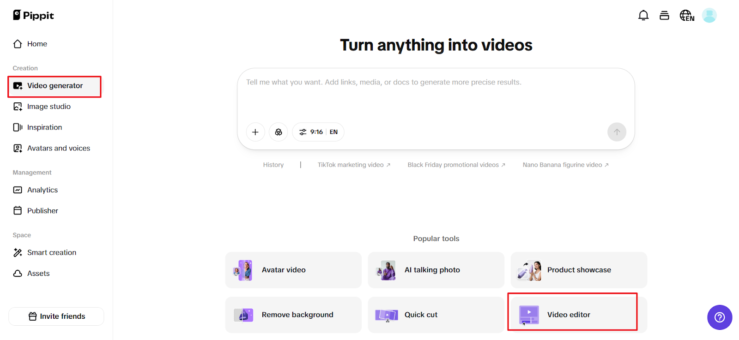
    Step 1: Open the video editor

    To remove text from video AI for free, you need to sign up for with your Google, TikTok, or Facebook login. After that, click either Video Generator or Smart Tools in the left corner and pick Video editor.

    Drag and drop your file to the working area, or click Click to Upload to upload it from your computer. This is your master file the one you will send.
    Brand-Safe Visuals: Removing Embedded Text to Localize Videos For Global Audiences

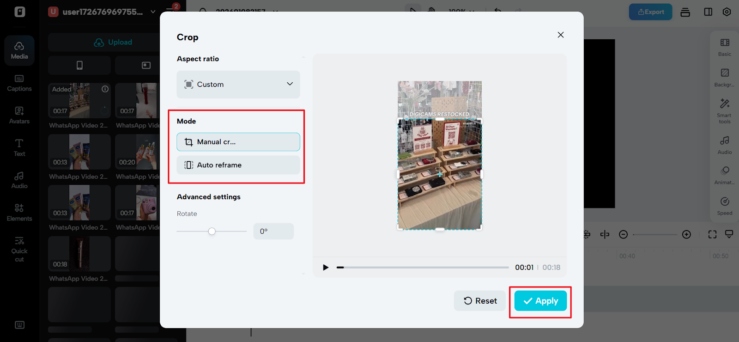
    Step 2: Remove text from video

    Now, open Smart Tools and choose Auto Reframe. Select the correct aspect ratio and either Manual Crop or Auto Reframe, and click Apply. This will reframe the video to remove embedded captions, slogans, watermark, etc., while holding the subject at the center.
    Brand-Safe Visuals: Removing Embedded Text to Localize Videos For Global Audiences

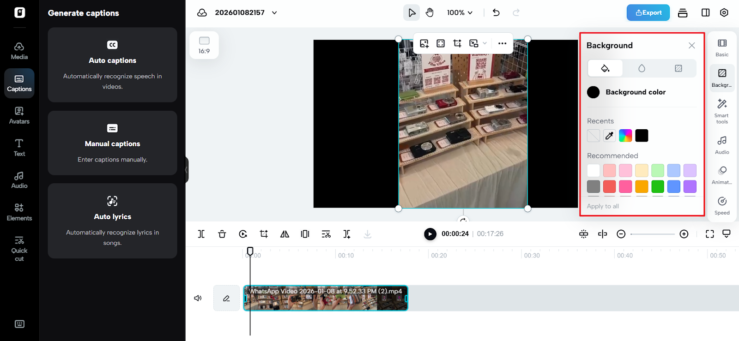
    To remove the background, if the text is on the background layer, click on the background to remove it, ensuring the remove background feature is on for the removal of the background. To add the background color, go to background, while for images, go to elements.

    This removes meaning specific to the words in the language and leaves a clean, flexible graphic.
    Brand-Safe Visuals: Removing Embedded Text to Localize Videos For Global Audiences

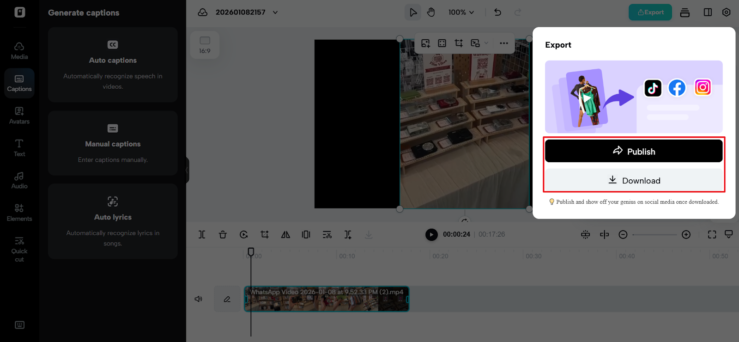
    Step 3: Export & share video

    When that video is brand-safe and rendered as a neutral video, click on “Export” located at the top right of the page. Select “Publish/Download,” determine your export options, and click “Export” again.

    You now have a localizable asset that can be combined with local messaging anywhere globally.
    Brand-Safe Visuals: Removing Embedded Text to Localize Videos For Global Audiences

    How global teams use clean visuals

    After resetting the video, teams usually:

    • Add captions in local languages per market
    • Adjust CTA buttons to regional regulation requirements
    • Use the same visuals in all campaigns
    • Carry out brand consistency without copying
    • Remove text from video

    The result is quicker launches, fewer mistakes, and a more seamless global footprint.

    Global reach begins with clean foundations

    Localization should not be a process of rebuilding, but adapting.

    Brands using Pippit break the barrier of understanding at the visual level to create content that is safe, flexible, and adaptable to all regions. The meaning is locked into a specific language, whereas with Pippit, the regions have the liberty to communicate with their audience.

    If your videos are holding you back in terms of global reach, it’s not because you need more versions. It is a better starting point.

    Previous ArticleGolden Globe Awards 2026: Full Winners List for Film and Television
    Next Article Shock Price! 2026 Tata Punch Facelift Starts at Just 5.59 Lakh
    Vanya Malhotra

      Vanya Malhotra is an experienced content writer with more than 10 years of expertise in creating engaging, reader-focused digital content. Over the years, she has written 4,000+ articles across diverse niches, including entertainment, lifestyle, travel, and trending news.Known for a clear writing style and strong storytelling approach, Vanya focuses on delivering well-researched, SEO-friendly content that connects with modern readers while maintaining authenticity and credibility. Her work reflects a deep understanding of audience behavior, search trends, and content strategy, making her a trusted voice in digital publishing.With a passion for turning ideas into impactful stories, Vanya continues to create content that informs, engages, and drives meaningful reader experiences across online platforms.

      Related Posts

      Product Reviews June 17, 2026Updated:June 17, 20268 Mins Read

      Top 10 Tissot Watches in India That Are Worth the Hype in 2026

      Entertainment June 17, 20265 Mins Read

      Sakshi Tanwar Best Movies and Web Series that Should be on Your Watchlist

      Lifestyle June 17, 2026Updated:June 17, 202610 Mins Read

      Top 10 Tallest Buildings in the World- Updated 2026

      Sports June 17, 2026Updated:June 17, 20267 Mins Read

      Seattle Stadium Records and Stats: Lumen Field’s “Beast Quake” Roar Powers FIFA World Cup 2026

      Sports June 17, 2026Updated:June 17, 20266 Mins Read

      San Francisco Bay Area Stadium by the Numbers: Inside the High-Tech Home of FIFA World Cup 2026

      Sports June 17, 2026Updated:June 17, 20267 Mins Read

      Philadelphia Stadium Records and Stats: Lincoln Financial Field Set to Electrify FIFA World Cup 2026

      Entertainment June 17, 20266 Mins Read

      Top 5 Prachi Desai Movies You Must Watch This Weekend

      Fitness June 17, 20267 Mins Read

      Eating for Abs: What It Really Means and How to Do It Right

      Latest Articles

      Top 10 Tissot Watches in India That Are Worth the Hype in 2026

      June 17, 2026

      Sakshi Tanwar Best Movies and Web Series that Should be on Your Watchlist

      June 17, 2026

      Top 10 Tallest Buildings in the World- Updated 2026

      June 17, 2026

      Seattle Stadium Records and Stats: Lumen Field’s “Beast Quake” Roar Powers FIFA World Cup 2026

      June 17, 2026

      San Francisco Bay Area Stadium by the Numbers: Inside the High-Tech Home of FIFA World Cup 2026

      June 17, 2026

      Philadelphia Stadium Records and Stats: Lincoln Financial Field Set to Electrify FIFA World Cup 2026

      June 17, 2026

      Top 5 Prachi Desai Movies You Must Watch This Weekend

      June 17, 2026

      Eating for Abs: What It Really Means and How to Do It Right

      June 17, 2026

      50 Best Mystery Movies of All Time: The Ultimate Watchlist You Cannot Ignore

      June 17, 2026

      Voicemails for Isabelle Release Date on Netflix: Everything to Know About the New Romantic Drama

      June 16, 2026
      About Flickonclick

      Flickonclick brings you the latest updates across entertainment, lifestyle, tech, and more. Stay informed with trending news and stories that matter.

      Facebook X (Twitter) Instagram
      Latest Articles
      • Top 10 Tissot Watches in India That Are Worth the Hype in 2026
      • Sakshi Tanwar Best Movies and Web Series that Should be on Your Watchlist
      • Top 10 Tallest Buildings in the World- Updated 2026
      • Seattle Stadium Records and Stats: Lumen Field’s “Beast Quake” Roar Powers FIFA World Cup 2026
      Important Links
      • About Us
      • Advertise with Us
      • Contact Us
      • Cookie Policy
      • Disclaimer
      • Home
      • Privacy Policy
      • Terms & Conditions
      © 2026 Flickonclick. All Rights Reserved

      Type above and press Enter to search. Press Esc to cancel.